Which file, which line#
| Shell | File | Add this |
|---|---|---|
| bash (Linux) | ~/.bashrc | [[ $- == *i* ]] && fastfetch |
| bash (macOS Terminal) | ~/.bash_profile that sources ~/.bashrc | see login shells |
| zsh (macOS default) | ~/.zshrc | fastfetch |
| fish | ~/.config/fish/config.fish | if status is-interactive; fastfetch; end |
| PowerShell (Windows) | $PROFILE | fastfetch |
Terminal apps such as GNOME Terminal, Konsole, kitty, Alacritty, WezTerm, Ghostty, iTerm2 or Windows Terminal all start your shell. So you configure the shell, not the terminal, and the same line works in every terminal you use. Open a new window to see the result.
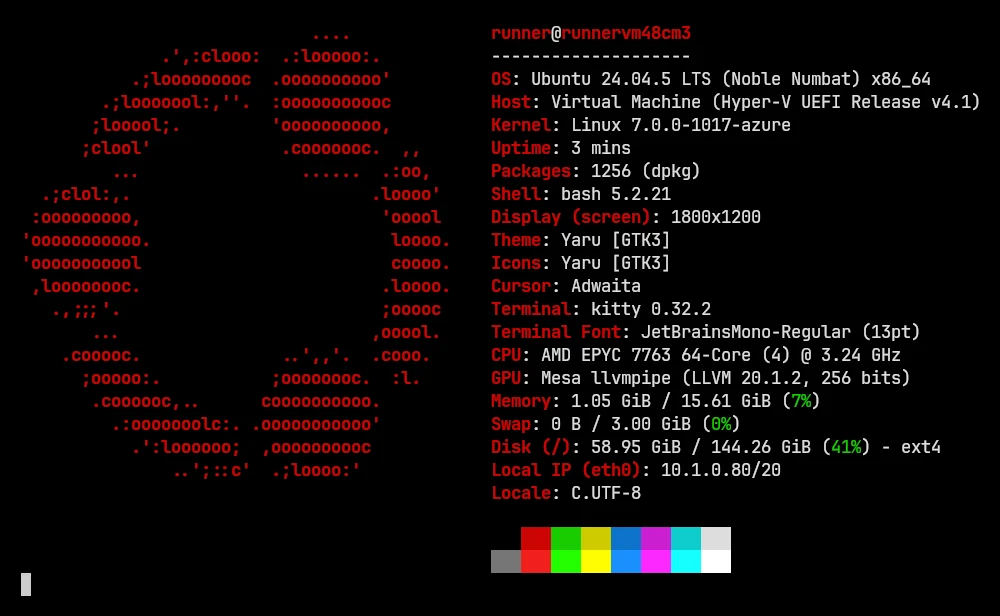
bash: ~/.bashrc#
# Only in interactive shells, so scp, rsync and "ssh host command" keep working
if [[ $- == *i* ]]; then
    fastfetch
fi
$- holds the shell's option letters, and it contains i only when the shell is interactive, as in a terminal window. In our tests this ran fastfetch exactly once in each new interactive bash, on Linux (bash 5.2) and macOS (bash 3.2). A non-interactive bash reading the same file printed nothing extra.
Why the check matters: scp, sftp and rsync#
When you run a command over SSH, including the hidden ones that scp, sftp and rsync start, bash on Ubuntu reads ~/.bashrc even though no one is looking at a terminal (Debian builds bash the same way; we tested Ubuntu 24.04). Anything printed there lands in the middle of the file-transfer protocol. We put a bare fastfetch line at the top of ~/.bashrc on an Ubuntu 24.04 machine and connected to it over SSH (OpenSSH 9.6, rsync 3.2.7):
| Command | fastfetch at the top of ~/.bashrc | With the interactive check |
|---|---|---|
scp file host: | ✗ exit 255: scp: Ensure the remote shell produces no output for non-interactive sessions. | ✓ |
sftp host | ✗ exit 255: same message | ✓ |
scp -O (old protocol) | ✗ exit 1: the fetch's text is read as the protocol reply | ✓ |
rsync file host: | ✗ exit 2: rsync error: protocol incompatibility (code 2) | ✓ |
ssh host 'echo done' | ✗ exit 0, but the whole fetch is printed before done | ✓ only done |
Ubuntu's own default ~/.bashrc stops for non-interactive shells in its first lines (case $- in *i*) ;; *) return;; esac). That's why appending fastfetch at the end of an untouched Ubuntu ~/.bashrc also passed all five tests. Not every distribution's default file has that check, though: the Fedora-style ~/.bashrc we saw on Bazzite doesn't. The if [[ $- == *i* ]] line protects you either way.
Login shells: macOS Terminal, SSH and text consoles#
A login shell (macOS's Terminal starts one in every window, and so does logging in over SSH or on a text console) reads ~/.bash_profile, not ~/.bashrc. We checked: with fastfetch only in ~/.bashrc and no ~/.bash_profile, a login bash showed nothing. Adding this ~/.bash_profile fixed it:
[[ -f ~/.bashrc ]] && . ~/.bashrcMany Linux distributions already ship a ~/.bash_profile or ~/.profile that does this. On macOS, zsh has been the default shell since macOS 10.15, so this only matters if you switched back to bash.
zsh: ~/.zshrc#
fastfetchzsh reads ~/.zshrc only in interactive shells, so no check is needed. We confirmed that zsh -c commands stayed clean on Linux and macOS (zsh 5.9). Don't use ~/.zshenv: zsh reads it for every zsh, including scripts and SSH commands, and in our test the fetch ended up in a plain command's output.
With Powerlevel10k or oh-my-zsh#
If your ~/.zshrc starts with Powerlevel10k's "instant prompt" block, put fastfetch above it. Powerlevel10k's documentation explains that while zsh starts, it captures everything printed after that block, so output "may appear uncolored", and it warns about console output during initialization. fastfetch can't draw image logos into captured output either.
fastfetch

# Enable Powerlevel10k instant prompt. Should stay close to the top of ~/.zshrc.
if [[ -r "${XDG_CACHE_HOME:-$HOME/.cache}/p10k-instant-prompt-${(%):-%n}.zsh" ]]; then
  source "${XDG_CACHE_HOME:-$HOME/.cache}/p10k-instant-prompt-${(%):-%n}.zsh"
fi
Without Powerlevel10k, oh-my-zsh doesn't care where the line goes; the end of the file is fine.
fish: config.fish or the greeting#
if status is-interactive
    fastfetch
end
Or replace fish's welcome message, which is what CachyOS does:
function fish_greeting
    fastfetch
end
Both ran fastfetch once per new terminal in our tests (fish 3.7 on Linux, fish 4.9 on macOS), and neither ran for fish -c commands. To turn a fish_greeting function off again, define it empty (function fish_greeting; end). set -U fish_greeting is not enough: it empties the greeting variable, and in our test the function still ran fastfetch.
PowerShell and Windows Terminal: $PROFILE#
if (!(Test-Path $PROFILE)) { New-Item -Path $PROFILE -ItemType File -Force }
notepad $PROFILE      # add a line: fastfetch
PowerShell runs $PROFILE when it starts. In PowerShell 7 that's Documents\PowerShell\Microsoft.PowerShell_profile.ps1; Windows PowerShell 5.1 uses Documents\WindowsPowerShell\. We tested it on Windows Server 2025: a new PowerShell window printed the fetch before its first command. Windows Terminal runs PowerShell, so nothing else is needed there. The Windows guide has more.
Variations#
Show it only in the first terminal, not in nested shells#
Opening a shell from a shell (running bash, or a terminal inside your editor) would fetch again. An exported variable stops that:
# Show it in the first shell only, not in shells started from it
if [[ $- == *i* ]] && [[ -z $FASTFETCH_SHOWN ]]; then
    export FASTFETCH_SHOWN=1
    fastfetch
fi
Tested: an interactive bash that started a second interactive bash showed one fetch, not two.
Clear the screen first#
if [[ $- == *i* ]]; then
    clear
    fastfetch
fi
A shorter fetch for every terminal#
Your startup line doesn't have to show the full output. Point it at a second, smaller config, or pick modules on the command line:
fastfetch -c ~/.config/fastfetch/greeting.jsonc
fastfetch --logo-type small -s title:os:kernel:uptime:packages:memory
The customization recipes include a tested minimal config.
How much slower does a new terminal open?#
Opening an interactive bash, with and without fastfetch
bash -i -c exit, median of 15 runs, 2026-11-02. fastfetch's output went to a pipe, as in a script.
View the data as a table
| Shell start | bash -i -c exit, median of 15 runs |
|---|---|
| Ubuntu 24.04, empty .bashrc | 2.4 ms |
| Ubuntu 24.04, with fastfetch | 14.4 ms (+12.0) |
| macOS 26, empty .bashrc | 9.2 ms |
| macOS 26, with fastfetch | 66.9 ms (+57.7) |
On the Ubuntu runner fastfetch added about 12 ms to each new shell; on the macOS runner, about 58 ms. On macOS most of a default run goes to three modules: Display (15.5 ms), GPU (8.1 ms) and Font (4.8 ms). Dropping modules you don't need makes the greeting faster. Run fastfetch --stat to see each module's time on your machine.
Turn it off#
- You added it yourself: delete the line, or comment it out with
#. - CachyOS (fish): the greeting comes from CachyOS's fish config. Override
fish_greeting; don't uninstall fastfetch there. - Someone else's dotfiles: search your startup files for it:
grep -n fastfetch ~/.bashrc ~/.bash_profile ~/.profile ~/.zshrc ~/.config/fish/config.fish 2>/dev/null. - Bazzite: fastfetch isn't run at startup there. The welcome text in new terminals is Bazzite's MOTD, which
ujust toggle-user-motdswitches off.
If you uninstall fastfetch but leave the line in place, every new terminal prints fastfetch: command not found. You can guard the line with command -v fastfetch >/dev/null && fastfetch.
What we tested#
Each snippet ran in a fresh, empty home directory, in a real pseudo-terminal (the kind a terminal window provides). We typed into it, then counted how many times fastfetch printed its output:
| Check | Linux | macOS |
|---|---|---|
| bash: "fastfetch" at the end of ~/.bashrc runs in every new interactive shell | ✓ 1 fetch | ✓ 1 fetch |
| bash: the interactive guard still shows it in a terminal | ✓ | ✓ |
| bash: with the guard, a non-interactive bash that reads ~/.bashrc prints nothing extra | ✓ clean output | ✓ clean output |
| bash without the check: a non-interactive bash that reads ~/.bashrc prints the fetch into the command's output (this ✓ means the problem was reproduced) | ✓ 1704 bytes of fetch before the output | ✓ 1768 bytes of fetch before the output |
| bash login shell with no ~/.bash_profile: ~/.bashrc is not read (✓ = nothing shown, as expected) | ✓ 0 fetches | ✓ 0 fetches |
| bash login shell: sourcing ~/.bashrc from ~/.bash_profile fixes it | ✓ | ✓ |
| bash: the FASTFETCH_SHOWN variable stops nested shells from fetching again | ✓ 1 fetch in 2 shells | ✓ 1 fetch in 2 shells |
| bash: clear first, then fetch | ✓ | ✓ |
| zsh: "fastfetch" in ~/.zshrc runs in every new terminal | ✓ | ✓ |
| zsh: ~/.zshrc is not read by non-interactive zsh, so scp and rsync are safe | ✓ | ✓ |
| zsh: a fetch in ~/.zshenv leaks into plain command output (✓ = reproduced) | ✓ | ✓ |
| fish: fastfetch inside "if status is-interactive" in config.fish | ✓ | ✓ |
| fish: the is-interactive block is skipped for fish -c | ✓ | ✓ |
| fish: replacing fish_greeting with fastfetch (this is what CachyOS does) | ✓ | ✓ |
| fish: an empty fish_greeting defined later turns it off | ✓ | ✓ |
| fish: set -U fish_greeting doesn't stop a fish_greeting function (✓ = it still ran) | ✓ 1 fetch | ✓ 1 fetch |
Shell versions: bash 5.2.21, zsh 5.9 and fish 3.7.0 on Ubuntu 24.04; bash 3.2.57, zsh 5.9 and fish 4.9.3 on macOS 26. The SSH, scp, sftp and rsync tests ran against the Ubuntu runner itself over a real SSH connection. Scripts and raw output: lab page.
Questions#
Why does fastfetch not show when I open a terminal on macOS with bash?
macOS Terminal starts login shells, which read ~/.bash_profile and skip ~/.bashrc. Source ~/.bashrc from ~/.bash_profile, as shown above, or use zsh, the macOS default.
Why does scp say 'Ensure the remote shell produces no output for non-interactive sessions'?
Something in the remote account's ~/.bashrc prints text, for example a fastfetch line without the interactive check. Wrap it in if [[ $- == *i* ]]; then … fi on the remote machine.
Can I run fastfetch from my terminal emulator's settings instead?
You can set many terminals to run a command instead of your shell, but then the window closes when fastfetch finishes unless you also start a shell afterwards. Adding the line to your shell's startup file is simpler, and it works the same in every terminal you open.
Does fastfetch at startup slow down my terminal?
A little. It added about 12 ms on our Linux runner and 58 ms on our macOS runner. Fewer modules make it faster; see the measurements.