Where is the fastfetch config file?#
Fastfetch does not create a config file on install; until you make one, it uses built-in defaults. When it starts, it looks for fastfetch/config.jsonc (then fastfetch/config.json5) in these folders and loads the first one it finds:
| System | Folders searched, in order |
|---|---|
| Linux, BSD | $XDG_CONFIG_HOME/ · ~/.config/ · ~/ · each $XDG_CONFIG_DIRS entry · /etc/xdg/ · /etc/ · the build's sysconfdir (e.g. /usr/local/etc/) |
| macOS | ~/.config/ · ~/Library/Preferences/ · ~/Library/Application Support/ · ~/ · /etc/ · Homebrew's /opt/homebrew/etc/ |
| Windows | %USERPROFILE%\.config\ · %ProgramData%\ · %APPDATA%\ · %LOCALAPPDATA%\ · %USERPROFILE%\ |
So for most people the file is ~/.config/fastfetch/config.jsonc, or C:\Users\<you>\.config\fastfetch\config.jsonc on Windows. The current directory is not searched automatically. To see the exact list on your machine, with a (*) next to a folder that already has a config:
fastfetch --list-config-pathsThe macOS and Windows rows are what fastfetch --list-config-paths printed on our macOS 26 (Homebrew) and Windows Server 2025 runners. On the Ubuntu runner it printed ~/.config/fastfetch/, ~/fastfetch/, /etc/xdg/fastfetch/ and /etc/fastfetch/, and a config in $XDG_CONFIG_HOME/fastfetch/ was picked up when that variable was set.
Does your distribution ship its own config?#
- CachyOS: no config file, but its fish setup runs fastfetch in every terminal (details).
- Bazzite: typing
fastfetchruns an alias with-c /usr/share/ublue-os/bazzite/fastfetch.jsonc, so your own config is ignored until you remove the alias (how). - EndeavourOS: no config by default; an optional one is in its Branding repository (details).
Load a specific file for one run with -c path/to/file.jsonc.
Create a config file with --gen-config#
fastfetch --gen-configSince 2.67.0 this opens an interactive setup when run in a terminal: pick modules, reorder them, choose a logo and position, and save. The keys are shown on screen: arrows or j/k to move, Space to toggle, K/J to reorder, l for the logo, p for the position, o for a minimal or full config, s or Enter to save, q or Esc to quit.
- Where it saves: the first config folder (normally
~/.config/fastfetch/config.jsonc). Pass a path to choose another:fastfetch --gen-config ./my.jsonc. Use-to print to the terminal. - Existing file: the interactive setup asks
File exists. Overwrite? (y/N). Non-interactive mode refuses:Error: file `…` exists. Please remove it before generating a new one. - Non-interactive mode applies when stdin or stdout isn't a terminal, when
NO_COLORis set, or on Windows before 10. It writes a minimal config with$schemaand your module list (from-s, or the default list minus--structure-disabled). Other flags you pass, such as--logo, are not saved. --gen-config-forceand--gen-config-fullwere removed in 2.67.0 and now fail withunknown option.
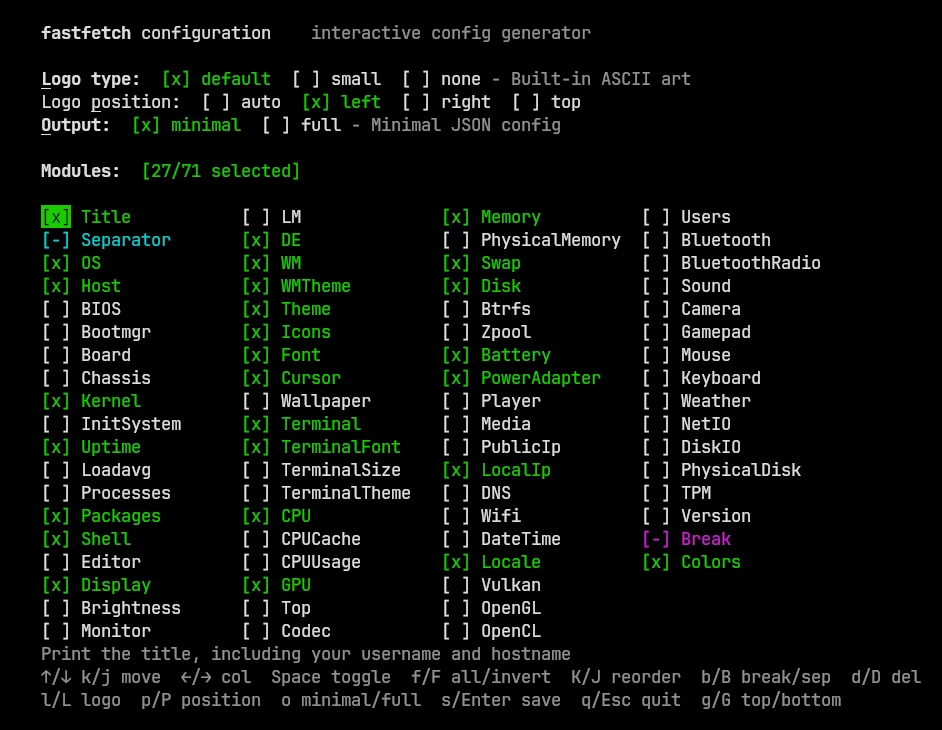
NO_COLOR=1 fastfetch -s os:cpu:gpu:memory --gen-config -A visual config generator#
Prefer clicking to editing JSON? The config builder at the top of this page lets you pick the logo, colors, separator and modules with a live preview, and gives you a config.jsonc that validates against the 2.71.0 schema. The fastfetch project also links an experimental official web configurator that covers every option.
What the default config shows#
Without a config file, fastfetch prints these 29 entries in this order, the "default structure" from its source:
Title · Separator · OS · Host · Kernel · Uptime · Packages · Shell · Display · DE · WM · WMTheme · Theme · Icons · Font · Cursor · Terminal · TerminalFont · CPU · GPU · Memory · Swap · Disk · LocalIp · Battery · PowerAdapter · Locale · Break · Colors
Modules that detect nothing are skipped silently, which is why a desktop shows lines a server doesn't. The generated config contains exactly this list, ready to edit. To show the default plus or minus a few modules without a config, use -s or --structure-disabled (examples).
Edit the config#
nano ~/.config/fastfetch/config.jsonc                      # Linux
open -e ~/.config/fastfetch/config.jsonc                   # macOS (TextEdit)
code ~/.config/fastfetch/config.jsonc # VS Code, with schema checksnotepad "$env:USERPROFILE\.config\fastfetch\config.jsonc"Changes apply the next time fastfetch runs; there's nothing to reload. Comments (//) and trailing commas are allowed.
Reset fastfetch to the default#
fastfetch -c none                                          # one run without your config
mv ~/.config/fastfetch/config.jsonc ~/config.jsonc.bak     # back to defaults for good
-c none skips the config file for a single run. In our tests a one-module config printed one line, and the same command with -c none printed the full default output on Linux, macOS and Windows. Setting NO_CONFIG=1 does the same. To reset permanently, move or delete the file; to start over, run fastfetch --gen-config again.
What goes in config.jsonc#
The file is JSONC: JSON that allows // comments and trailing commas. A config.json5 (JSON5) is also accepted since 2.51.0. Keys are case-sensitive. There are five top-level keys:
{
  // Lets VS Code and other editors autocomplete and check every option
  "$schema": "https://github.com/fastfetch-cli/fastfetch/raw/dev/doc/json_schema.json",
  "logo": {
    "source": "arch",           // a built-in name, a file path, or omit to auto-detect
    "padding": { "right": 2 }
  },
  "general": {
    "processingTimeout": 5000   // ms to wait for child processes
  },
  "display": {
    "separator": " → ",
    "color": { "keys": "blue", "title": "cyan" },
    "key": { "width": 12 }      // align values in a column
  },
  "modules": [
    "title",
    "separator",
    "os",
    { "type": "cpu", "temp": true },
    { "type": "memory", "key": "RAM" },
    "disk",
    "break",
    "colors"
  ]
}| Key | Controls |
|---|---|
logo | Which logo, its type (built-in, file, image protocol, or the spinning spin type), colors, padding, position. null disables it. See logos. |
general | Behavior: threading, processingTimeout, version detection, preload.lua. |
display | Looks: separator, colors, key width and icons, size units, percent style, bars, constants, pipe, showErrors, stat. |
modules | The ordered list of what to print. Strings use defaults; objects take options. |
Module options#
Every module object needs a "type". These keys work on any module:
| Key | Example | Effect |
|---|---|---|
key | "key": "RAM" | Rename the key. Exactly one space, " ", hides it. |
format | "format": "{used} / {total}" | Custom output. See format strings. |
keyColor, outputColor | "keyColor": "magenta" | Colors for this module only. |
keyWidth | "keyWidth": 10 | Column width for this key. |
keyIcon | "keyIcon": "" | Icon used when display.key.type shows icons (needs a Nerd Font). |
condition | "condition": {"system": ["Linux"]} | Only run on some systems or architectures. |
Module-specific options, such as temp for CPU or driverSpecific for GPU, are listed per module in the module explorer. They exist only in the config file: per-module command-line flags like --cpu-temp were removed in 2.50.0.
Percent styles#
display.percent.type is a set of flags added together: 1 = number, 2 = bar, 4 = hide other text, 8 = color the number, 16 = single-color bar. The useful combinations:
| Value | Shows |
|---|---|
9 (default) | Colored number, e.g. (24%) in green |
1 | Plain number |
2 | A bar instead of the number; sizes still shown |
3 | Bar and number |
6 | Bar only |
Thresholds can be set per module: "percent": {"type": 3, "green": 40, "yellow": 75} shows green below 40%, yellow from 40% and red from 75%.
Recipes and themes#
Ready-made configs, each run on Linux, macOS and Windows and downloadable:
- Hide your IP address · show OS age · CPU and GPU temperature
- Colors · a minimal fetch · Nerd Font icons · boxes · renamed keys · usage bars
- Color themes: Catppuccin, Nord, Gruvbox, Rosé Pine, Tokyo Night, plus all 37 bundled presets
Hardware report with temperatures and bars#
One more, for a detailed hardware overview. It validates against the 2.71.0 schema; temperature lines need real sensors (see why).
{
  "$schema": "https://github.com/fastfetch-cli/fastfetch/raw/dev/doc/json_schema.json",
  "display": {
    "key": { "width": 14 },
    "percent": { "type": 3 }
  },
  "modules": [
    "title",
    "separator",
    "host",
    "board",
    { "type": "cpu", "temp": true },
    "cpucache",
    { "type": "gpu", "temp": true, "driverSpecific": true },
    { "type": "memory", "percent": { "green": 40, "yellow": 75 } },
    "physicalmemory",
    "swap",
    { "type": "disk", "folders": "/" },
    "physicaldisk",
    "battery",
    "poweradapter"
  ]
}
Run fastfetch when a terminal opens#
Add [[ $- == *i* ]] && fastfetch to ~/.bashrc, fastfetch to ~/.zshrc, or if status is-interactive; fastfetch; end to fish's config.fish. The bash check keeps scp and rsync working. The startup guide has every shell, with snippets we ran in real shells.
JSON schema and checking a config for mistakes#
- Use the
$schemaline. Editors with JSON-schema support (such as VS Code) then autocomplete options and underline invalid keys. - Unknown keys in
logo,generalordisplaystop fastfetch withJsonConfig Error (display.foo): Unknown display property. - Unknown keys inside a module don't stop it. They are only reported with
--show-errors(Unknown JSON key …). - Renamed options print their replacement. The breaking-changes table lists every recent one.
- A config piped in with
-c -must be strict JSON (no comments or trailing commas), and only one-cis allowed per run.
Copying configs from the internet#
A config can run shell commands: the command module and the command-raw logo type execute whatever they contain, every time fastfetch starts. The README warns that configs from untrusted sources "may contain malicious commands". Before using one, search it for "command" and read what it runs.