Install fastfetch on Arch Linux#
fastfetch is in Arch's official extra repository, so there is nothing to enable first:
sudo pacman -S fastfetch
fastfetch
In a clean archlinux:latest container this installed fastfetch 2.70.0, then the current release, in about 10 seconds. The package was built on 2026-10-14, the same day 2.70.0 was released. It needs only two libraries, glibc and yyjson; everything else is optional (see below). This is the real output from that container:
                  -`                     root@30dbf301a1f7
                 .o+`                    -----------------
                `ooo/                    OS: Arch Linux x86_64
               `+oooo:                   Host: Virtual Machine (Hyper-V UEFI Release v4.1)
              `+oooooo:                  Kernel: Linux 7.0.0-1017-azure
              -+oooooo+:                 Uptime: 1 min
            `/:-:++oooo+:                Packages: 139 (pacman)
           `/++++/+++++++:               Shell: bash 5.3.20
          `/++++++++++++++:              Display (Virtual-1): 1024x768
         `/+++ooooooooooooo/`            CPU: AMD EPYC 7763 64-Core (4) @ 3.19 GHz
        ./ooosssso++osssssso+`           Memory: 1.03 GiB / 15.61 GiB (7%)
       .oossssso-````/ossssss+`          Swap: 0 B / 3.00 GiB (0%)
      -osssssso.      :ssssssso.         Disk (/): 59.08 GiB / 144.26 GiB (41%) - overlay
     :osssssss/        osssso+++.        Local IP (eth0): 172.17.0.2/16
    /ossssssss/        +ssssooo/-        Locale: C.UTF-8
  `/ossssso+/:-        -:/+osssso+-
 `+sso+:-`                 `.-/+oso:
`++:.                           `-/+/
.`                                 `/
archlinux:latest container on GitHub's Ubuntu runner, fastfetch 2.70.0, 2026-11-02. PublicIp and Weather disabled. Host, CPU and memory are the CI virtual machine's.Host, CPU and memory are the GitHub runner's virtual machine. On your own PC the lines for your desktop, GPU and display also fill in. Here is the same command in the kitty terminal on Arch, as a screenshot:
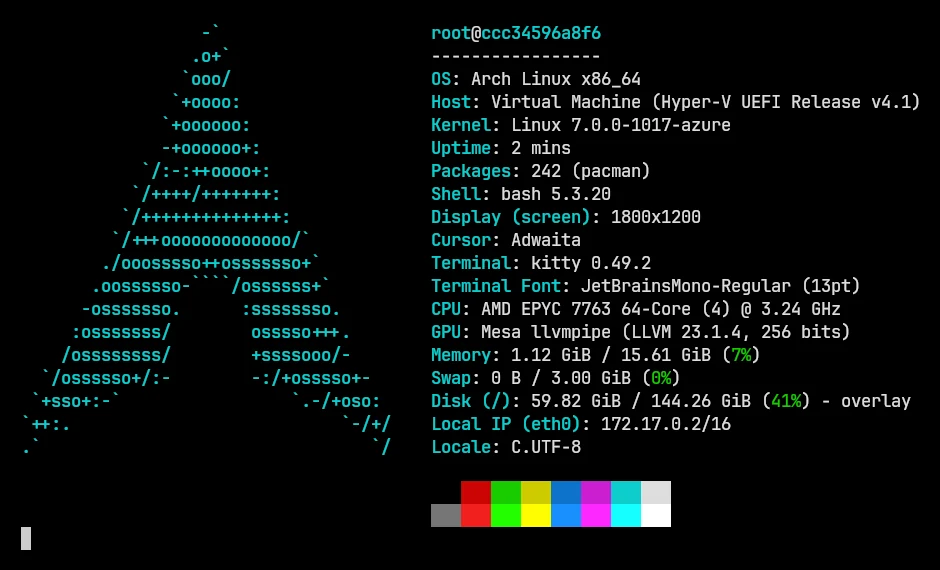
To update, upgrade the whole system as usual (sudo pacman -Syu); Arch doesn't support upgrading single packages. If fastfetch prints "command not found" right after installing, check that the install finished with pacman -Q fastfetch, then open a new terminal or run hash -r so the shell forgets its old lookup.
Optional dependencies: what each one adds#
The Arch package keeps fastfetch small by making most features optional. fastfetch loads these libraries at run time, so a missing one doesn't stop it from starting: the related module or feature just stays empty or falls back. The descriptions are the package's own optdepends (checked 2026-11-02):
| Package | What it enables | You want it if… |
|---|---|---|
imagemagick | Image output using sixel or kitty graphics protocol | you want a picture instead of the ASCII logo. On Arch this is ImageMagick 7, which also makes animated GIF logos possible |
chafa | Image output as ascii art | your terminal has no image protocol (--logo-type chafa) |
zlib | Faster image output when using kitty graphics protocol | you use kitty, Ghostty or WezTerm with an image logo |
hwdata | GPU output | GPU names look like PCI IDs |
vulkan-icd-loader | Vulkan module & fallback for GPU output | you use the Vulkan module |
libglvnd · ocl-icd | OpenGL module · OpenCL module | you add those modules |
libdrm · libxrandr | Displays detection · Multi monitor support | resolutions or monitors are missing |
dbus | Bluetooth, Player & Media detection | you show what's playing or Bluetooth devices |
dconf · glib2 | Settings that only live in DConf or GSettings | theme, icons or font are empty on GNOME-based desktops |
libva · libvdpau | Hardware video codec detection | you use the Codec module |
lua | Lua scripting in format section of JSON config | you write lua: formats |
sqlite | Sqlite integration and Soar packages count | you count Soar packages |
libelf | st terminal font detection, faster systemd version detection | you use st |
python | Needed for zsh and fish completions | tab completion of fastfetch's options doesn't work |
Install the ones you need as dependencies, so pacman can clean them up again with fastfetch:
sudo pacman -S --asdeps imagemagick chafaOn a full desktop install most of these are already present because other software needs them. A minimal install, like our container, has none of them.
Image and animated GIF logos on Arch#
Arch's fastfetch is built against ImageMagick 7. That matters for animated logos: fastfetch 2.69 added GIF and APNG playback over the kitty graphics protocol, and on Linux the source code only enables it in builds that use ImageMagick 7. Ubuntu's PPA build uses ImageMagick 6 and prints Logo: the image source can not be animated by this build instead. We recorded this in kitty on Arch:
The logos guide covers image logos for every terminal.
fastfetch-git from the AUR (development version)#
The extra package follows releases, which come out every few weeks. If you want fixes from the dev branch before they're released, build fastfetch-git from the AUR:
yay -S fastfetch-gitsudo pacman -S --needed base-devel git
git clone https://aur.archlinux.org/fastfetch-git.git
cd fastfetch-git
makepkg -siWe tested the makepkg route in a clean Arch container (an AUR helper runs the same PKGBUILD). Installing build tools and compiling took 135 seconds, and the result reported fastfetch 2.70.0-19-debug. Both parts of that suffix are expected:
-19means 19 commits after the 2.70.0 tag.-debugappears because the PKGBUILD builds withCMAKE_BUILD_TYPE=None, and fastfetch prints-debugwhen it wasn't compiled in release mode.
The package provides and conflicts with fastfetch, so pacman swaps one for the other. The version shown on the AUR web page (2.10.2…) is stale, which is normal for -git packages: makepkg works out the real version when it builds.
dev. The extra package is built from a release, updates with the rest of your system, and doesn't need a compiler.CachyOS: fastfetch is already installed#
You don't need to install anything on CachyOS. Its installer selects fastfetch twice over:
- It's in the "Some applications selection" group, which is ticked by default in the installer's package list (netinstall.yaml).
- It's a dependency of
cachyos-fish-config, CachyOS's default fish setup.
In our CachyOS container, pacman pulled fastfetch 2.70.0 from Arch's extra repository, the same package as on Arch.
           .-------------------------:                    root@038f1e4ab327
          .+=========================.                    -----------------
         :++===++==================-       :++-           OS: CachyOS x86_64
        :*++====+++++=============-        .==:           Host: Virtual Machine (Hyper-V UEFI Release v4.1)
       -*+++=====+***++==========:                        Kernel: Linux 7.0.0-1017-azure
      =*++++========------------:                         Uptime: 3 mins
     =*+++++=====-                     ...                Packages: 185 (pacman)
   .+*+++++=-===:                    .=+++=:              Shell: bash 5.3.20
  :++++=====-==:                     -*****+              Display (Virtual-1): 1024x768
 :++========-=.                      .=+**+.              CPU: AMD EPYC 7763 64-Core (4) @ 3.17 GHz
.+==========-.                          .                 Memory: 1.16 GiB / 15.61 GiB (7%)
 :+++++++====-                                .--==-.     Swap: 0 B / 3.00 GiB (0%)
  :++==========.                             :+++++++:    Disk (/): 59.68 GiB / 144.26 GiB (41%) - overlay
   .-===========.                            =*****+*+    Local IP (eth0): 172.17.0.2/16
    .-===========:                           .+*****+:    Locale: C
      -=======++++:::::::::::::::::::::::::-:  .---:
       :======++++====+++******************=.
        :=====+++==========++++++++++++++*-
         .====++==============++++++++++*-
          .===+==================+++++++:
           .-=======================+++:
             ..........................
cachyos/cachyos container on GitHub's Ubuntu runner, fastfetch 2.70.0, 2026-11-02. PublicIp and Weather disabled. Host, CPU and memory are the CI virtual machine's.Why fastfetch runs every time you open a terminal#
Fish is CachyOS's default shell (the installer also offers zsh and bash). cachyos-fish-config replaces fish's greeting with fastfetch, in /usr/share/cachyos-fish-config/cachyos-config.fish:
## Run fastfetch as welcome message
function fish_greeting
    fastfetch
end
Every new user's ~/.config/fish/config.fish (copied from /etc/skel) sources that file on its first line. We created a new user in the CachyOS container and opened an interactive fish: fastfetch ran once, before the prompt.
If you chose zsh during installation, nothing runs fastfetch. CachyOS's zsh config (cachyos-zsh-config) doesn't call it, and our new zsh user got the Powerlevel10k setup wizard instead. To add it under zsh, see below.
How to disable fastfetch on CachyOS#
Define an empty greeting in your own fish config, after the line that sources CachyOS's file. CachyOS's default ~/.config/fish/config.fish even has a commented-out placeholder for this:
source /usr/share/cachyos-fish-config/cachyos-config.fish

# overwrite greeting
# potentially disabling fastfetch
function fish_greeting
end
We tested exactly this. The same new user's next fish terminal showed no fastfetch output, down from one fetch to none. Changes take effect in new terminals, or run exec fish to restart the current one.
To keep the greeting but change what it shows, put something else inside the function. For example fastfetch --logo-type small, or fastfetch -c ~/.config/fastfetch/greeting.jsonc for a separate short config.
sudo pacman -R fastfetch fails, because CachyOS's fish setup depends on it:
checking dependencies...
:: removing fastfetch breaks dependency 'fastfetch' required by cachyos-fish-config
error: failed to prepare transaction (could not satisfy dependencies)pacman -Rs fastfetch cachyos-fish-config) worked, but it also removed CachyOS's whole fish setup: bat, eza, fzf, fisher, the Pure prompt, autopair, tealdeer, pkgfile and the Fantasque Nerd Font, 56.97 MiB in our container. Your ~/.config/fish/config.fish still starts with a source line pointing to the removed file, so you'd have to delete that line too. If you just don't want to see fastfetch, turn off the greeting instead.Where is the fastfetch config on CachyOS?#
There isn't one until you make it. CachyOS doesn't ship a custom fastfetch config: a search of the whole CachyOS container found only the files of the fastfetch package itself. The greeting runs plain fastfetch with its built-in defaults. Create your own config the usual way, and the greeting picks it up automatically:
fastfetch --gen-config          # interactive, writes ~/.config/fastfetch/config.jsonc
fastfetch --list-config-paths   # every place fastfetch looks, in order
The configuration guide explains the file. The themes page has ready configs.
Running fastfetch under zsh on CachyOS#
CachyOS's zsh config enables Powerlevel10k's instant prompt at the very top. Powerlevel10k's documentation says console output during startup should go above that block: anything after it has its output captured, may appear uncolored, and triggers a warning. In ~/.zshrc, put fastfetch before the line that sources CachyOS's config:
fastfetch
source /usr/share/cachyos-zsh-config/cachyos-config.zsh
The startup guide has tested snippets for every shell.
Manjaro#
sudo pacman -Syu fastfetchManjaro isn't Arch: it holds packages back and releases them in three branches. On 2026-11-02 its mirrors had:
| Manjaro branch | fastfetch |
|---|---|
| stable (the default) | 2.69.0 |
| testing | 2.70.0 |
| unstable | 2.70.0 |
Our container on the stable branch installed 2.69.0. fastfetch knows about the branches: on Manjaro the Packages line ends with the branch name, read from /etc/pacman-mirrors.conf. You'll see 191 (pacman)[stable] in the capture below, and it's available as {pacman-branch} in a format string. The graphical Add/Remove Software app (Pamac) installs the same package.
██████████████████  ████████    root@c91b320a478a
██████████████████  ████████    -----------------
██████████████████  ████████    OS: Manjaro Linux x86_64
██████████████████  ████████    Host: Virtual Machine (Hyper-V UEFI Release v4.1)
████████            ████████    Kernel: Linux 7.0.0-1017-azure
████████  ████████  ████████    Uptime: 4 mins
████████  ████████  ████████    Packages: 191 (pacman)[stable]
████████  ████████  ████████    Shell: bash 5.3.20
████████  ████████  ████████    Display (Virtual-1): 1024x768
████████  ████████  ████████    CPU: AMD EPYC 7763 64-Core (4) @ 3.19 GHz
████████  ████████  ████████    Memory: 1.21 GiB / 15.61 GiB (8%)
████████  ████████  ████████    Swap: 0 B / 3.00 GiB (0%)
████████  ████████  ████████    Disk (/): 60.43 GiB / 144.26 GiB (42%) - overlay
████████  ████████  ████████    Local IP (eth0): 172.17.0.2/16
                                Locale: C
manjarolinux/base container on GitHub's Ubuntu runner, fastfetch 2.69.0, 2026-11-02. PublicIp and Weather disabled. Host, CPU and memory are the CI virtual machine's.If you want 2.70.0 now on stable, the release archive from GitHub runs without installing anything. Building fastfetch-git from the AUR also works in principle, but AUR packages are written against current Arch, which Manjaro's stable branch trails.
EndeavourOS#
sudo pacman -S fastfetchEndeavourOS uses Arch's repositories directly, so you get the same 2.70.0 package as on Arch. It doesn't install fastfetch by default: it's not in the ISO's package list, and a search of the EndeavourOS team's GitHub repositories finds fastfetch only in their Branding repository. That repository has an optional config you can copy to ~/.config/fastfetch/. It shows a random EndeavourOS PNG as the logo, so it needs a terminal that can draw images, and it adds an "OS Age" line based on the first entry in /var/log/pacman.log. EndeavourOS has no official container image, so unlike the others on this page we couldn't run it ourselves. The customization page has a built-in OS Age line that needs no shell command.
Arch-family logos#
fastfetch detects your distribution and picks its logo automatically. To use another one, pass its name. Names are case-insensitive:
fastfetch --logo arch_small     # the small Arch logo
fastfetch --logo-type small     # the small logo of whatever you're running
fastfetch --list-logos | grep -i -E 'arch|cachy|manjaro|endeavour|garuda'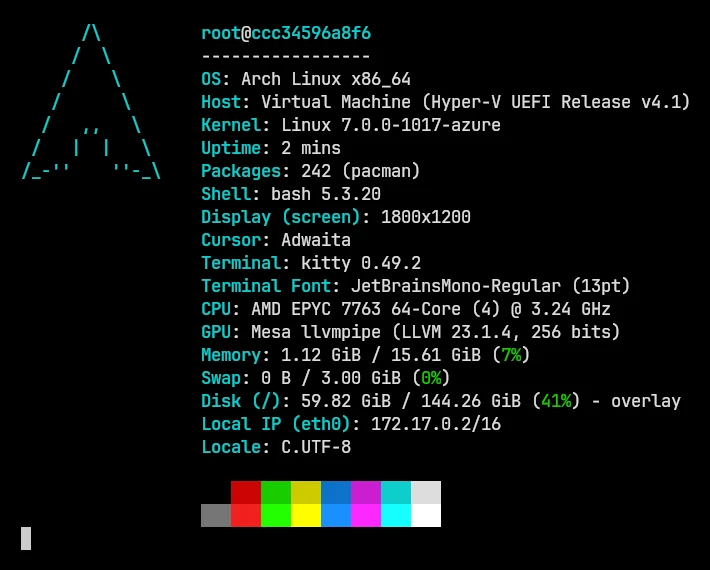
fastfetch 2.71.0 has these logos for Arch and its family. Click through to the logo gallery to preview them:
arch · arch2 · arch3 · arch_small · arch_old · CachyOS · CachyOS_small · CachyOS_old_small · manjaro · manjaro_small · EndeavourOS · EndeavourOS_small · Garuda · GarudaDragon · Garuda_small · artix · artix2 · artix3 · artix_small · arco · Archcraft · Archcraft2 · ArchStrike · Blackarch · Parabola · RebornOS · Omarchy · Omarchy2
To make a logo permanent, set it in your config:
{
  "$schema": "https://github.com/fastfetch-cli/fastfetch/raw/dev/doc/json_schema.json",
  "logo": { "source": "arch_small" }
}
Uninstall fastfetch on Arch#
sudo pacman -Rns fastfetchOn Arch this removed fastfetch and its only now-unneeded dependency, yyjson. pacman removes only the files the package installed (pacman -Ql fastfetch lists them). A config you created in ~/.config/fastfetch/, and fastfetch's cache in ~/.cache/fastfetch/, stay until you delete them yourself. On CachyOS, read the warning above first. If you added fastfetch to your shell startup, remove that line too, or new terminals will print fastfetch: command not found.
What we tested#
All results come from clean containers on GitHub's Ubuntu 24.04 runners, on 2026-11-02:
| System | Method | Container image | Result | Notes |
|---|---|---|---|---|
| Arch Linux | pacman -S fastfetch | archlinux:latest | ✓ 2.70.0 | extra repository, 10 s |
| Arch Linux (fastfetch-git from the AUR) | AUR fastfetch-git with makepkg | archlinux:latest | ✓ 2.70.0 | 2.70.0-19-debug, built in 135 s |
| CachyOS | pacman -S fastfetch | cachyos/cachyos | ✓ 2.70.0 | from Arch's extra repository |
| Manjaro | pacman -Syu fastfetch | manjarolinux/base | ✓ 2.69.0 | Manjaro stable branch |
We also tested CachyOS's shell defaults for a new user (fish greeting on, then off; zsh) and what pacman -R does there. The scripts and raw results are on the lab page.
Questions#
Is fastfetch in the official Arch repositories?
Yes, in extra, as fastfetch. Install it with sudo pacman -S fastfetch. On 2026-11-02 it had 2.70.0, the latest release at the time; on 2026-11-06, the day 2.71.0 came out, it still had 2.70.0.
Is Neofetch still available on Arch?
Not in the official repositories. On 2026-11-02 a search of archlinux.org found no neofetch package; it exists only in the AUR (7.1.0). Neofetch's own repository was archived in April 2024. fastfetch -c neofetch gives you Neofetch's layout; see migrating from Neofetch.
How do I stop fastfetch from running when I open a terminal on CachyOS?
Add an empty function fish_greeting … end to ~/.config/fish/config.fish, after the source line. Details. Don't uninstall the package for this: pacman refuses unless you also remove CachyOS's fish setup.
Why is my fastfetch older on Manjaro than on Arch?
Manjaro's stable branch receives Arch packages after a delay. On 2026-11-02 stable had 2.69.0 while testing and unstable had 2.70.0.
Should I install fastfetch or fastfetch-git?
fastfetch from extra, unless you need a fix that's only on the development branch. The -git package compiles on your machine (135 seconds in our test) and has to be rebuilt to update.
Why does my image logo not show on Arch?
Install imagemagick (for the kitty and sixel protocols) or chafa (for text-block images). Both are optional dependencies. Then run fastfetch with --show-errors, which prints the reason when an image can't be drawn. The troubleshooting guide lists the messages.