--help, its changes don't touch what those rounds tested. Round three, below, ran 2.71.0 and 2.70.0 side by side to check what changed.How we tested#
We ran everything on GitHub Actions on 2026-11-02, in a repository set up only for this test. The machines:
| System | Machine | fastfetch installed from |
|---|---|---|
| Linux | Ubuntu 24.04 runner, x86-64, 4 vCPUs, image 20261026 | The official PPA (ppa:zhangsongcui3371/fastfetch), 2.70.0 |
| macOS | macOS 26 runner, Apple silicon, 3 vCPUs, image 20261026 | Homebrew, 2.70.0 |
| Windows | Windows Server 2025 Datacenter runner, x86-64, 4 vCPUs | Scoop, 2.70.0 (Chocolatey and winget tested too) |
These are virtual machines in a data centre. They have no graphics card, battery, Wi-Fi or desktop session, so some modules print little or nothing, and absolute timings are not what a laptop would show. Comparisons on the same machine, such as fastfetch vs Neofetch, are fair. The PublicIp and Weather modules were disabled in every run, so no test contacted outside services.
Real output#
The default fastfetch output on each machine, captured and rendered exactly as a 110-column terminal displays it. Every bundled preset's real output is in the preset browser.
                             ....              runner@runnervm48cm3
              .',:clooo:  .:looooo:.           --------------------
           .;looooooooc  .oooooooooo'          OS: Ubuntu 24.04.5 LTS (Noble Numbat) x86_64
        .;looooool:,''.  :ooooooooooc          Host: Virtual Machine (Hyper-V UEFI Release v4.1)
       ;looool;.         'oooooooooo,          Kernel: Linux 7.0.0-1017-azure
      ;clool'             .cooooooc.  ,,       Uptime: 2 mins
         ...                ......  .:oo,      Packages: 1267 (dpkg)
  .;clol:,.                        .loooo'     Shell: suite.py
 :ooooooooo,                        'ooool     Display (Virtual-1): 1024x768
'ooooooooooo.                        loooo.    Theme: Yaru [GTK3]
'ooooooooool                         coooo.    Icons: Yaru [GTK3]
 ,loooooooc.                        .loooo.    Cursor: Adwaita
   .,;;;'.                          ;ooooc     Terminal: Runner.Worker
       ...                         ,ooool.     CPU: AMD EPYC 7763 64-Core (4) @ 2.44 GHz
    .cooooc.              ..',,'.  .cooo.      Memory: 978.70 MiB / 15.61 GiB (6%)
      ;ooooo:.           ;oooooooc.  :l.       Swap: 0 B / 3.00 GiB (0%)
       .coooooc,..      coooooooooo.           Disk (/): 58.99 GiB / 144.26 GiB (41%) - ext4
         .:ooooooolc:. .ooooooooooo'           Local IP (eth0): 10.1.1.146/20
           .':loooooo;  ,oooooooooc            Locale: C.UTF-8
               ..';::c'  .;loooo:'
                     ..'          runner@sat12-dp152-ca6eb0e0-4c53-4fc8-a5b0-b46648ab57ec-56E45FD315DC
                 ,xNMM.           --------------------------------------------------------------------
               .OMMMMo            OS: macOS Tahoe 26.6.2 (25G83) arm64
               lMM"               Host: Apple Virtual Machine 1
     .;loddo:.  .olloddol;.       Kernel: Darwin 25.6.0
   cKMMMMMMMMMMNWMMMMMMMMMM0:     Uptime: 2 mins
 .KMMMMMMMMMMMMMMMMMMMMMMMWd.     Packages: 131 (brew), 5 (brew-cask)
 XMMMMMMMMMMMMMMMMMMMMMMMX.       Shell: suite.py
;MMMMMMMMMMMMMMMMMMMMMMMM:        Display (Apple Virtual): 1024x768 in 31", 60 Hz [External]
:MMMMMMMMMMMMMMMMMMMMMMMM:        Window Manager: Quartz Compositor 1.600.0
.MMMMMMMMMMMMMMMMMMMMMMMMX.       WM Theme: Multicolor (Light)
 kMMMMMMMMMMMMMMMMMMMMMMMMWd.     Theme: Liquid Glass
 'XMMMMMMMMMMMMMMMMMMMMMMMMMMk    Font: .AppleSystemUIFont [System], Helvetica [User]
  'XMMMMMMMMMMMMMMMMMMMMMMMMK.    Cursor: Fill - Black, Outline - White (32px)
    kMMMMMMMMMMMMMMMMMMMMMMd      Terminal: Runner.Worker
     ;KMMMMMMMWXXWMMMMMMMk.       CPU: Apple M1 (Virtual) (3)
       "cooc*"    "*coo'"         GPU:  [Integrated]
                                  Memory: 3.65 GiB / 7.00 GiB (52%)
                                  Swap: Unused
                                  Disk (/): 223.76 GiB / 319.51 GiB (70%) - apfs [Read-only]
                                  Local IP (en0): 192.168.64.24/24
                                  Locale: en_US.UTF-8
      ##%%%%%%%%%  %%%%%%%%%##          runneradmin@runnervmhao91
    ###%%%%%%%%%%  %%%%%%%%%%###        -------------------------
  ####%%%%%%%%%%%  %%%%%%%%%%%####      OS: Windows Server 2025 Datacenter (24H2) x86_64
 ##%%%%%%%%%%%%%%  %%%%%%%%%%%%%%##     Host: Virtual Machine (Hyper-V UEFI Release v4.1)
#%%%%%%%%%%%%%%%%  %%%%%%%%%%%%%%%%#    Kernel: WIN32_NT 10.0.26100.33674
%%%%%%%%%%%%%%%%%  %%%%%%%%%%%%%%%%%    Uptime: 5 mins
%%%%%%%%%%%%%%%%%  %%%%%%%%%%%%%%%%%    Packages: 46 (choco), 3 (scoop)
%%%%%%%%%%%%%%%%%  #%%%%%%%%%%%%%%%%    Shell: PowerShell 7.6.9
                                        Display (MSH062E): 1024x768, 64 Hz
%%%%%%%%%%%%%%%%%  #%%%%%%%%%%%%%%%%    Window Manager: Desktop Window Manager 10.0.26100.7309
%%%%%%%%%%%%%%%%%  %%%%%%%%%%%%%%%%%    WM Theme: Aero - Blue (System: Light, Apps: Light)
%%%%%%%%%%%%%%%%%  %%%%%%%%%%%%%%%%%    Theme: Fluent
%%%%%%%%%%%%%%%%%  %%%%%%%%%%%%%%%%#    Icons: Recycle Bin
 ###%%%%%%%%%%%%%  %%%%%%%%%%%%%%%##    Font: Segoe UI (12pt) [Caption / Menu / Message / Status]
  ####%%%%%%%%%%%  %%%%%%%%%%%#%####    Cursor: Windows Default (32px)
    ##%#%%%%%%%%%  %%%%%%%%%%%######    Terminal: svchost 10.0.26100.32684
      ##%%%%%%%%%  %%%%%%%%%########    CPU: AMD EPYC 7763 64-Core (4) @ 3.52 GHz
                                        GPU: Microsoft Hyper-V Video
                                        Memory: 2.65 GiB / 15.99 GiB (17%)
                                        Swap: 0 B / 2.88 GiB (0%)
                                        Disk (C:\): 119.48 GiB / 149.89 GiB (80%) - NTFS
                                        Disk (D:\): 2.99 GiB / 150.00 GiB (2%) - NTFS
                                        Local IP (Ethernet 3): 10.1.0.110/20
                                        Locale: en_US.UTF-8
Speed: fastfetch vs Neofetch#
Measured with hyperfine: 5 warm-up runs, then 50 timed runs of each command, output to a pipe, no shell in between. On the same Ubuntu machine, fastfetch 2.70.0 took 11.7 ± 0.3 ms and Neofetch 7.1.0 took 158.7 ± 1.5 ms, so fastfetch was about 13.6 times faster.
Mean run time on the Ubuntu 24.04 runner (lower is faster)
hyperfine, 50 runs each. fastfetch 2.40.4 is the version Debian 13 ships, downloaded from the official release.
View the data as a table
| Command (hyperfine) | Mean ± std dev, Ubuntu 24.04 runner |
|---|---|
| fastfetch 2.70.0 | 11.7 ± 0.3 ms |
| fastfetch -c neofetch | 11.5 ± 0.6 ms |
| neofetch 7.1.0 | 158.7 ± 1.5 ms |
| fastfetch 2.40.4 (Debian 13) | 11.0 ± 0.3 ms |
- Old vs new fastfetch: 2.40.4 (11.0 ms) and 2.70.0 (11.7 ms) are practically the same. Thirty releases of new features didn't make it slower in any meaningful way.
- The Neofetch look costs nothing:
fastfetch -c neofetchtook 11.5 ms. - Neofetch isn't available on macOS any more:
brew install neofetchfound no formula, so the macOS comparison is fastfetch only.
macOS 26 runner (hyperfine, 50 runs)
Mean run time. Spread is larger on the shared macOS machines.
View the data as a table
| Command (hyperfine) | Mean ± std dev, macOS 26 runner (Apple silicon) |
|---|---|
| fastfetch 2.70.0 | 33.5 ± 7.6 ms |
| fastfetch -c neofetch | 36.0 ± 7.7 ms |
Windows Server 2025 runner (30 runs)
Median run time measured with a Python timer. Scoop build, output to a pipe.
View the data as a table
| Command | Median time, Windows Server runner |
|---|---|
| fastfetch 2.70.0 default (Scoop) | 22.8 ms |
| fastfetch -c neofetch | 22.0 ms |
| fastfetch 4 modules, no logo | 16.9 ms |
Which default modules take the time#
fastfetch's own --stat timing, median of 10 runs of the default module list. On the Linux machine, counting packages was the most expensive step; on macOS, display and GPU detection were.
Ubuntu 24.04 runner
View the data as a table
| Module | Median of 10 runs (--stat), Ubuntu 24.04 runner |
|---|---|
| Packages | 4.95 ms |
| Display | 2.16 ms |
| GPU | 1.35 ms |
| Theme | 1.30 ms |
| CPU | 0.12 ms |
| LocalIp | 0.11 ms |
| Disk | 0.10 ms |
| Host | 0.06 ms |
| Terminal | 0.04 ms |
| Shell | 0.04 ms |
macOS 26 runner
View the data as a table
| Module | Median of 10 runs (--stat), macOS 26 runner (Apple silicon) |
|---|---|
| Display | 15.5 ms |
| GPU | 8.07 ms |
| Font | 4.84 ms |
| Cursor | 0.86 ms |
| WM | 0.45 ms |
| WMTheme | 0.37 ms |
| PowerAdapter | 0.32 ms |
| Terminal | 0.23 ms |
| Uptime | 0.20 ms |
| CPU | 0.18 ms |
Install commands, actually run#
Each row started from a clean official container image and ran the command from our install guide. "Installed" is the version fastfetch --version-raw reported afterwards.
| Test | Commands run in a clean container | Result | Time |
|---|---|---|---|
| almalinux-9-epel | dnf install -y epel-release && dnf install -y fastfetch | ✓ installed 2.66.0 | 28s |
| alpine-apk | apk add --upgrade fastfetch | ✓ installed 2.64.2 | 4s |
| arch-pacman | pacman -Sy --noconfirm fastfetch | ✓ installed 2.70.0 | 9s |
| debian-12-apt | apt-get update && apt-get install -y fastfetch | ✗ E: Unable to locate package fastfetch | 5s |
| debian-12-deb | apt-get update && apt-get install -y curl ca-certificates && curl -fsSLO https://github.com/fastfetch-cli/fastfetch/releases/latest/download/fastfetch-linux-amd64.deb && apt-get install -y ./fastfetch-linux-amd64.deb | ✓ installed 2.70.0 | 11s |
| debian-13-apt | apt-get update && apt-get install -y fastfetch | ✓ installed 2.40.4 | 6s |
| fedora-dnf | dnf install -y fastfetch | ✓ installed 2.68.1 | 14s |
| linuxbrew | brew install fastfetch | ✓ installed 2.70.0 | 81s |
| nixos-nix-shell | nix-shell -p fastfetch | ✓ installed 2.63.1 | 37s |
| opensuse-tumbleweed-zypper | zypper -n install fastfetch | ✓ installed 2.70.0 | 13s |
| ubuntu-22.04-deb | apt-get update && apt-get install -y curl ca-certificates && curl -fsSLO https://github.com/fastfetch-cli/fastfetch/releases/latest/download/fastfetch-linux-amd64.deb && apt-get install -y ./fastfetch-linux-amd64.deb | ✓ installed 2.70.0 | 12s |
| ubuntu-22.04-ppa | apt-get update && apt-get install -y software-properties-common && add-apt-repository -y ppa:zhangsongcui3371/fastfetch && apt-get install -y fastfetch | ✓ installed 2.66.0 | 37s |
| ubuntu-24.04-apt | apt-get update && apt-get install -y fastfetch | ✗ E: Unable to locate package fastfetch | 8s |
| ubuntu-24.04-deb | apt-get update && apt-get install -y curl ca-certificates && curl -fsSLO https://github.com/fastfetch-cli/fastfetch/releases/latest/download/fastfetch-linux-amd64.deb && apt-get install -y ./fastfetch-linux-amd64.deb | ✓ installed 2.70.0 | 15s |
| ubuntu-24.04-ppa | apt-get update && apt-get install -y software-properties-common && add-apt-repository -y ppa:zhangsongcui3371/fastfetch && apt-get install -y fastfetch | ✓ installed 2.70.0 | 62s |
| ubuntu-26.04-apt | apt-get update && apt-get install -y fastfetch | ✓ installed 2.57.1 | 13s |
| void-xbps | xbps-install -Syu xbps; xbps-install -Sy fastfetch | ✓ installed 2.70.0 | 7s |
On Windows, all three package managers worked. Scoop installed 2.70.0 and Chocolatey 2.68.1. winget finished with "Path environment variable modified; restart your shell to use the new value", which is why our Windows guide tells you to open a new terminal.
What we found that differs from the docs#
- The Ubuntu PPA doesn't have the latest version for 22.04. The README says the PPA covers "Ubuntu 22.04 or newer; latest version", but adding it on 22.04 installed 2.66.0. Launchpad's build log shows every 22.04 build since 2.67.0 failing, because fastfetch now needs a C23 compiler and 22.04's GCC 11 is too old. The GitHub
.debinstalled 2.70.0 on 22.04 without problems. We updated the Ubuntu guide. - An invalid config with
--format jsonprints no JSON. Before this test, this site said fastfetch would print a JSON error object. In fact stdout stays empty, the message goes to stderr and the exit code is 221 (477 on Windows). We corrected the JSON reference. - Piping does not remove the ASCII logo. The official wiki's troubleshooting section says piped output loses "all colors and logo". In our test, piped output had no colors but still printed the logo. Use
--pipe --logo nonefor plain text. - Unknown keys inside a module are silent unless you add
--show-errors, while unknown keys indisplay,logoorgeneralstop fastfetch with exit code 221. Confirmed on all three systems.
Every check, on every system#
Each row is a statement this site makes, the command we ran, and whether the real output agreed (✓) or not (✗). Exit codes are shown where they matter: note how the same error is 144 on Linux and macOS but 400 on Windows.
| What the site says | Linux | macOS | Windows | Command |
|---|---|---|---|---|
| fastfetch --version-raw prints major.minor.patch | ✓ | ✓ | ✓ | fastfetch --version-raw |
| 76 modules | ✓ | ✓ | ✓ | fastfetch --list-modules |
| 541 built-in logos | ✓ | ✓ | ✓ | fastfetch --list-logos |
| 37 bundled presets | ✓ | ✓ | ✓ | fastfetch --list-presets |
| prints the config search folders | ✓ | ✓ | ✓ | fastfetch --list-config-paths |
| prints the data folders | ✓ | ✓ | ✓ | fastfetch --list-data-paths |
| prints compiled-in features | ✓ | ✓ | ✓ | fastfetch --list-features |
| default structure has 29 modules | ✓ | ✓ | ✓ | fastfetch --print-structure |
| When stdout is not a terminal, colors are removed | ✓ | ✓ | ✓ | fastfetch -s os:kernel |
| When piped, the ASCII logo is still printed (uncolored) | ✓ | ✓ | ✓ | fastfetch -s os:kernel |
| --pipe false forces colors | ✓ | ✓ | ✓ | fastfetch -s os:kernel --pipe false |
| NO_COLOR turns pipe mode on (no colors) unless --pipe false is given later | ✓ | ✓ | ✓ | fastfetch -s os:kernel --pipe false |
| --pipe --logo none prints plain text without a logo | ✓ | ✓ | ✓ | fastfetch -s os:kernel --pipe --logo none |
| --format json prints an array of {type, result|error} | ✓ | ✓ | ✓ | fastfetch -s cpu:memory --format json |
| -j is an alias for JSON output | ✓ | ✓ | ✓ | fastfetch -s memory -j |
| With --stat each JSON object has a "stat" field | ✓ | ✓ | ✓ | fastfetch -s memory --format json --stat |
| An invalid config in JSON mode prints the error to stderr, nothing on stdout, and exits 221 / 477 | ✓ exit 221 | ✓ exit 221 | ✓ exit 477 | fastfetch -c <file> --format json |
| A JSON syntax error in the config: message and exit code | ✓ exit 221 | ✓ exit 221 | ✓ exit 477 | fastfetch -c <file> --format json |
| --dynamic-interval cannot be combined with JSON | ✓ exit 144 | ✓ exit 144 | ✓ exit 400 | fastfetch --format json --dynamic-interval 1000 |
| -c all runs 73 modules (71 with the two network modules disabled) | ✓ | ✓ | ✓ | fastfetch -c all --structure-disabled publicip:weather --format json |
| Plain --format json prints the default modules, not every module | ✓ | ✓ | ✓ | fastfetch --format json |
| Unknown option exits 144 (POSIX) / 400 (Windows) | ✓ exit 144 | ✓ exit 144 | ✓ exit 400 | fastfetch --this-option-does-not-exist |
| Missing config exits 158 / 414 with "couldn't find config" | ✓ exit 158 | ✓ exit 158 | ✓ exit 414 | fastfetch -c definitely-not-a-config |
| Two -c options exit 157 / 413 | ✓ exit 157 | ✓ exit 157 | ✓ exit 413 | fastfetch -c none -c none |
| Unknown display key: "JsonConfig Error (display.foo): Unknown display property", exit 221 / 477 | ✓ exit 221 | ✓ exit 221 | ✓ exit 477 | fastfetch -c <file> |
| logo.recache error text (2.69.0) | ✓ exit 221 | ✓ exit 221 | ✓ exit 477 | fastfetch -c <file> |
| --logo-recache has been replaced by --logo-cache regen | ✓ exit 221 | ✓ exit 221 | ✓ exit 477 | fastfetch --logo-recache |
| general.preRun is removed due to security concerns | ✓ exit 221 | ✓ exit 221 | ✓ exit 477 | fastfetch -c <file> |
| Keys are case-sensitive (display.Separator is unknown) | ✓ exit 221 | ✓ exit 221 | ✓ exit 477 | fastfetch -c <file> |
| display.bar.charElapsed has been renamed to display.bar.char.elapsed | ✓ exit 221 | ✓ exit 221 | ✓ exit 477 | fastfetch -c <file> |
| --gen-config-force was removed (unknown option) | ✓ exit 144 | ✓ exit 144 | ✓ exit 400 | fastfetch --gen-config-force |
| --load-config was removed (unknown option) | ✓ exit 144 | ✓ exit 144 | ✓ exit 400 | fastfetch --load-config x |
| Per-module flags fail with "Unsupported module option" and show the JSON to use | ✓ exit 221 | ✓ exit 221 | ✓ exit 477 | fastfetch --cpu-temp |
| -s command is refused, exit 225 / 481 | ✓ exit 225 | ✓ exit 225 | ✓ exit 481 | fastfetch -s command |
| useStdErr is deprecated, use useOutput instead (2.70.0) | ✓ | ✓ | ✓ | fastfetch -c <file> --show-errors --pipe |
| Unknown keys inside a module are only reported with --show-errors | ✓ | ✓ | ✓ | fastfetch -c <file> --pipe --show-errors |
| Unknown keys at the top level are not checked | ✓ | ✓ | ✓ | fastfetch -c <file> --pipe |
| -c - reads a strict JSON config from stdin | ✓ | ✓ | ✓ | fastfetch -c - --pipe -l none |
| -c - rejects comments / trailing commas | ✓ exit 221 | ✓ exit 221 | ✓ exit 477 | fastfetch -c - --pipe -l none |
| Non-interactive --gen-config writes $schema + modules | ✓ | ✓ | ✓ | fastfetch --gen-config <file> |
| Non-interactive --gen-config refuses an existing file (221 / 477) | ✓ exit 221 | ✓ exit 221 | ✓ exit 477 | fastfetch --gen-config <file> |
| NO_COLOR=1 fastfetch -s os:cpu --gen-config - prints the config | ✓ | ✓ | ✓ | fastfetch -s os:cpu --gen-config - |
| --gen-config respects --structure-disabled | ✓ | ✓ | ✓ | fastfetch --structure-disabled battery:colors --gen-config - |
| Other flags such as --logo are not saved | ✓ | ✓ | ✓ | fastfetch -l arch --gen-config - |
| In a terminal, --gen-config opens an interactive setup; q cancels with exit 0 | ✓ | ✗ | n/a | fastfetch --gen-config (pty) |
| --structure-disabled removes modules from the default list | ✓ | ✓ | ✓ | fastfetch --structure-disabled battery:colors:localip --pipe -l none |
| --stat appends per-module times and prints no total line | ✓ | ✓ | ✓ | fastfetch -s os:kernel:uptime --stat --pipe -l none |
| Logo "arch" is built in (names are case-insensitive) | ✓ | ✓ | ✓ | fastfetch -l arch -s os --pipe --show-errors |
| Logo "ARCH" is built in (names are case-insensitive) | ✓ | ✓ | ✓ | fastfetch -l ARCH -s os --pipe --show-errors |
| Logo "Windows 11" is built in (names are case-insensitive) | ✓ | ✓ | ✓ | fastfetch -l Windows 11 -s os --pipe --show-errors |
| Logo "nura" is built in (names are case-insensitive) | ✓ | ✓ | ✓ | fastfetch -l nura -s os --pipe --show-errors |
| Logo "arch_small" is built in (names are case-insensitive) | ✓ | ✓ | ✓ | fastfetch -l arch_small -s os --pipe --show-errors |
| postmarketos was renamed to nura in 2.70.0 | ✓ | ✓ | ✓ | fastfetch -l postmarketos --logo-type builtin -s os --pipe --show-errors |
| --logo-type small works | ✓ | ✓ | ✓ | fastfetch --logo-type small -s os --pipe |
| -l none prints no logo | ✓ | ✓ | ✓ | fastfetch -l none -s os --pipe |
The one ✗ is our own test on macOS: fastfetch's interactive --gen-config setup opened and drew its module list, but our script couldn't close it with a keypress inside the macOS pseudo-terminal. On Linux the same test passed (pressing q exits with code 0). Windows has no pseudo-terminal for this test.
Format-string engine, checked against the real thing#
Our format playground reimplements fastfetch's format engine in JavaScript. To prove it matches, we ran the same 20 format strings through real fastfetch on each system, using the Command module to print "Arch Linux":
| Format (value "Arch Linux") | Expected | Linux | macOS | Windows |
|---|---|---|---|---|
{result:4} | 'Arch' | ✓ | ✓ | ✓ |
{result:-5} | 'Arch…' | ✓ | ✓ | ✓ |
{result<-6} | 'Arch …' | ✓ | ✓ | ✓ |
{result<14} | 'Arch Linux ' | ✓ | ✓ | ✓ |
{result>14} | ' Arch Linux' | ✓ | ✓ | ✓ |
{result|14} | ' Arch Linux ' | ✓ | ✓ | ✓ |
{result<6} | 'Arch L' | ✓ | ✓ | ✓ |
{result~0,4} | 'Arch' | ✓ | ✓ | ✓ |
{result~5} | 'Linux' | ✓ | ✓ | ✓ |
{result~-5,-1} | 'Linu' | ✓ | ✓ | ✓ |
{result~2,} | '' | ✓ | ✓ | ✓ |
{{result} | '{result}' | ✓ | ✓ | ✓ |
{nope} | '{nope}' | ✓ | ✓ | ✓ |
{result}{-}zzz | 'Arch Linux' | ✓ | ✓ | ✓ |
{$1} | '───' | ✓ | ✓ | ✓ |
{$FFLAB} | 'from-env' | ✓ | ✓ | ✓ |
{1} | 'Arch Linux' | ✓ | ✓ | ✓ |
{}{} | 'Arch Linux{}' | ✓ | ✓ | ✓ |
{?result}yes{?}{/result}no{/} | 'yes' | ✓ | ✓ | ✓ |
[{result:20}] | '[Arch Linux]' | ✓ | ✓ | ✓ |
Round two: configs, shells, images and more distributions#
For the guides added later the same day, we ran a second, larger set of tests on the same kinds of machines. It covered:
- Every customization recipe and color theme on all three systems.
- Every shell-startup snippet, in real interactive shells.
- Image logos and GIF animation, in the kitty terminal on a virtual display.
- Installs on Linux Mint, LMDE, Kali, Manjaro, CachyOS and Bazzite, and a build from the AUR.
Recipes, themes and image logos#
Each recipe and theme on the customization and themes pages ran with fastfetch 2.70.0 and was checked for errors and for its specific effect. For example, the theme checks confirmed that every palette color reached the terminal as the exact 24-bit color.
| Check | Linux | macOS | Windows |
|---|---|---|---|
| recipe bars runs without a config error | ✓ | ✓ | ✓ |
| recipe boxed runs without a config error | ✓ | ✓ | ✓ |
| recipe colors runs without a config error | ✓ | ✓ | ✓ |
| recipe hide-ip runs without a config error | ✓ | ✓ | ✓ |
| recipe icons runs without a config error | ✓ | ✓ | ✓ |
| recipe mask-ip runs without a config error | ✓ | ✓ | ✓ |
| recipe minimal runs without a config error | ✓ | ✓ | ✓ |
| recipe os-age runs without a config error | ✓ | ✓ | ✓ |
| recipe rename-keys runs without a config error | ✓ | ✓ | ✓ |
| recipe temperatures runs without a config error | ✓ | ✓ | ✓ |
| theme catppuccin-mocha runs without a config error | ✓ | ✓ | ✓ |
| theme gruvbox-dark runs without a config error | ✓ | ✓ | ✓ |
| theme nord runs without a config error | ✓ | ✓ | ✓ |
| theme rose-pine runs without a config error | ✓ | ✓ | ✓ |
| theme tokyo-night runs without a config error | ✓ | ✓ | ✓ |
| The default output includes the Local IP module | ✓ | ✓ | ✓ |
| hide-ip.jsonc removes the Local IP line | ✓ | ✓ | ✓ |
| fastfetch --structure-disabled localip hides it for one run | ✓ | ✓ | ✓ |
| mask-ip.jsonc keeps the line but prints no address | ✓ | ✓ | ✓ |
| os-age.jsonc prints "OS Age: N days (installed YYYY-MM-DD)" | ✓ | ✓ | ✓ |
| temperatures.jsonc runs (a sensor reading needs real hardware) | ✓ | ✓ | ✓ |
| "#e5e9f0" becomes the truecolor escape 38;2;229;233;240 | ✓ | ✓ | ✓ |
| display.color.keys "cyan" colors the keys | ✓ | ✓ | ✓ |
| display.key.type "both" prints Nerd Font icons (private-use characters) | ✓ | ✓ | ✓ |
| minimal.jsonc prints a short fetch with the small logo | ✗ | ✓ | ✗ |
| boxed.jsonc draws the key column inside a box | ✓ | ✓ | ✓ |
| Custom keys replace the defaults | ✓ | ✓ | ✓ |
| percent type ["bar","num"] draws a bar before the percentage | ✓ | ✓ | ✓ |
| Catppuccin Mocha: every palette color reaches the terminal as truecolor | ✓ | ✓ | ✓ |
| Nord: every palette color reaches the terminal as truecolor | ✓ | ✓ | ✓ |
| Gruvbox Dark: every palette color reaches the terminal as truecolor | ✓ | ✓ | ✓ |
| Rosé Pine: every palette color reaches the terminal as truecolor | ✓ | ✓ | ✓ |
| Tokyo Night: every palette color reaches the terminal as truecolor | ✓ | ✓ | ✓ |
| --logo-color-1 accepts #RRGGBB | ✓ | ✓ | ✓ |
| $XDG_CONFIG_HOME/fastfetch/config.jsonc is loaded | ✓ | ✓ | ✓ |
| -c none ignores your config file for one run | ✓ | ✓ | ✓ |
| --logo-type chafa turns a PNG into colored text blocks | ✗ | ✗ | ✗ |
| A missing image prints "Logo: Failed to resolve logo source" (only with --show-errors) and falls back to the distro logo | ✓ | ✓ | ✓ |
| Without --show-errors the same mistake is silent | ✓ | ✓ | ✓ |
| A relative logo path only works from the directory that contains the image | ✓ | ✓ | ✓ |
| A bare file name is also looked up in $XDG_DATA_HOME/fastfetch/logos/ | ✓ | ✓ | n/a |
| "~/" in a logo path is expanded | ✓ | ✓ | n/a |
| The kitty protocol writes the image as escape codes; in a non-kitty context fastfetch reports why it cannot | ✓ | ✓ | ✓ |
| The sixel logo type encodes the image as sixel data | ✓ | ✓ | ✓ |
The five ✗ are limits of our test, not of fastfetch:
- "minimal" counted lines, and the small Ubuntu and Windows logos are taller than our threshold allowed. The config itself ran fine everywhere (the "runs without a config error" rows above).
- "chafa" ran with output captured to a file, and image logos need a real terminal. fastfetch said so with
Logo: getCharacterPixelDimensions() failed. In a real terminal, chafa worked (screenshots).
Shell startup#
All 17 snippet checks passed on Linux and on macOS. The SSH tests ran against the Linux machine itself, over a real SSH connection. With fastfetch at the top of an unguarded ~/.bashrc, scp, sftp, scp -O and rsync all failed, and ssh host command printed the fetch into its output. Those five "failures" are the breakage the startup guide warns about, reproduced on purpose. With the interactive check, or below Ubuntu's own early return, all five worked.
More distributions#
| System | Method | Container image | Result | Notes |
|---|---|---|---|---|
| Linux Mint 22.3 | linuxmintd/mint22.3-amd64 | ✗ E: Unable to locate package fastfetch | ||
| Linux Mint 22.3 (PPA) | linuxmintd/mint22.3-amd64 | ✓ 2.70.0 | ||
| Linux Mint 22.3 (.deb) | linuxmintd/mint22.3-amd64 | ✓ 2.70.0 | ||
| Linux Mint 21.3 | linuxmintd/mint21.3-amd64 | ✗ E: Unable to locate package fastfetch | ||
| Linux Mint 21.3 (PPA) | linuxmintd/mint21.3-amd64 | ✓ 2.66.0 | ||
| Linux Mint 21.3 (.deb) | linuxmintd/mint21.3-amd64 | ✓ 2.70.0 | ||
| LMDE 7 | linuxmintd/lmde7-amd64 | ✓ 2.40.4 | ||
| LMDE 6 | linuxmintd/lmde6-amd64 | ✗ E: Unable to locate package fastfetch | ||
| Kali Linux | kalilinux/kali-rolling | ✓ 2.69.0 | ||
| Debian 13 | debian:13 | ✓ 2.40.4 | trixie-backports enabled; apt candidate stays 2.40.4+dfsg-1 from trixie/main | |
| Arch Linux | archlinux:latest | ✓ 2.70.0 | ||
| Arch Linux (fastfetch-git from the AUR) | archlinux:latest | ✓ 2.70.0 | built from the AUR: 2.70.0-19-debug | |
| Manjaro | manjarolinux/base | ✓ 2.69.0 | ||
| CachyOS | cachyos/cachyos | ✓ 2.70.0 | ||
| Linux Mint 23 (pre-release image) | linuxmintd/mint23-amd64 | ✗ E: The repository 'http://packages.linuxmint.com alfa Release' no longer has a Release file. |
Two more systems got a closer look, beyond installing:
- CachyOS: what a new user's shells do (fish runs fastfetch as its greeting; zsh doesn't), how to turn the greeting off, and why
pacman -R fastfetchfails (results). - Bazzite: the image has too many layers for Docker, so we flattened it and ran it in a chroot. fastfetch 2.68.1 is preinstalled behind an alias that forces Bazzite's config (results).
Screenshots#
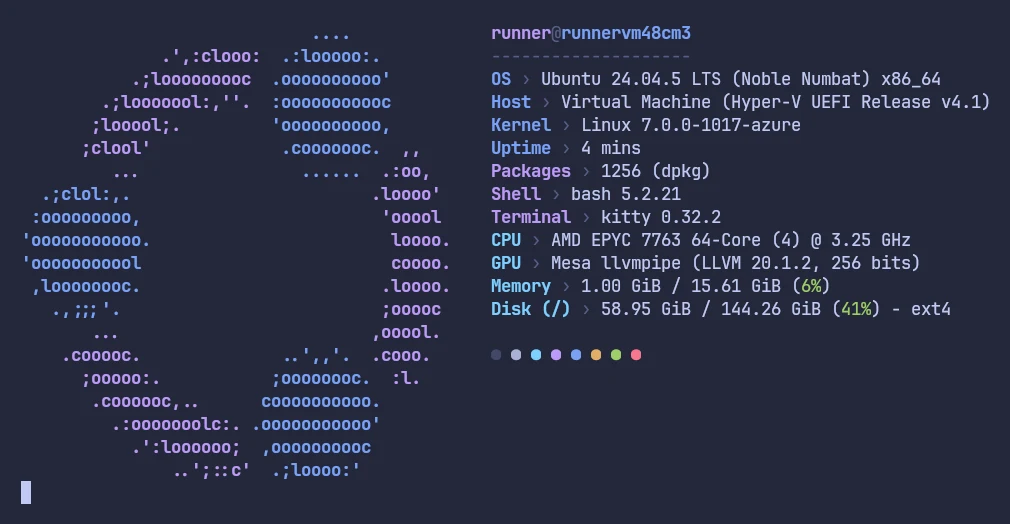
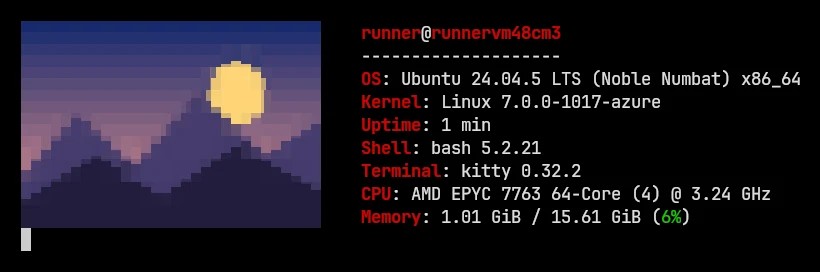
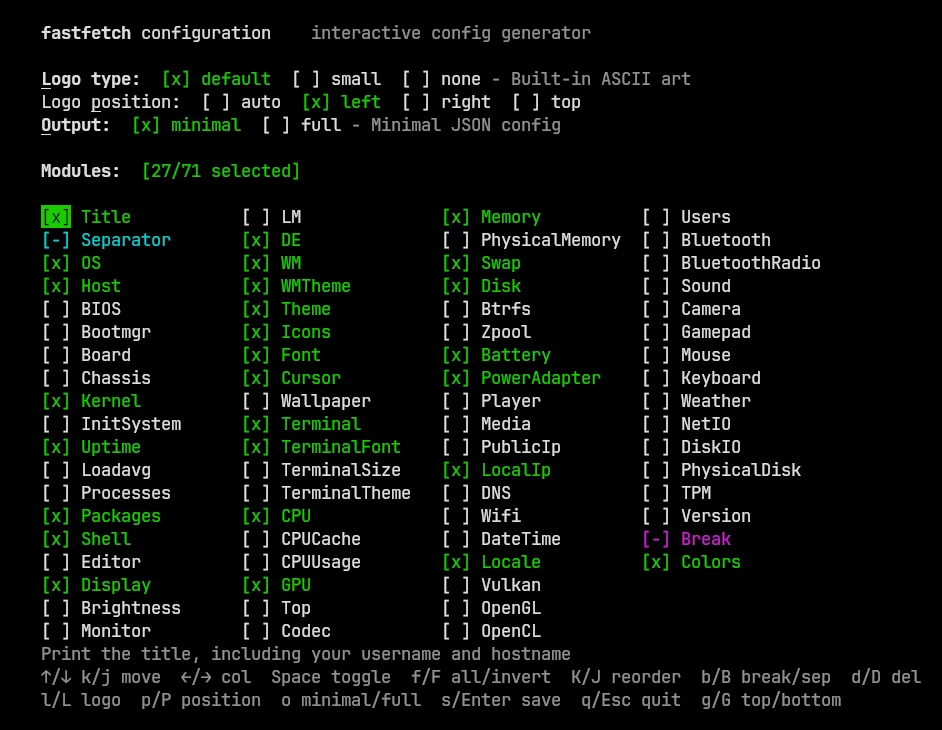
The screenshots on this site come from the kitty terminal running on a virtual display: Ubuntu 24.04 with kitty 0.32.2, and Arch Linux with kitty 0.49.2. They're cropped but otherwise unedited. Three examples:
More things we found#
- Animated GIF logos need ImageMagick 7 on Linux. Ubuntu's PPA build (ImageMagick 6) refuses with
the image source can not be animated by this build; Arch's build plays them. - Image logos fail silently without a terminal. Only
--show-errorsrevealsgetCharacterPixelDimensions() failed. - A misspelled logo name and a missing image file give the same message:
Failed to resolve logo source. command-rawlogos work on the command line too, although the wiki says "config only".- Removing fastfetch on CachyOS is refused by pacman, because CachyOS's fish setup depends on it.
- The macOS universal zip is only ad-hoc signed, not notarized. The Windows
.exehas a valid SignPath signature. - Debian 13's backports don't have a newer fastfetch; it stays at 2.40.4.
- Homebrew has no Intel macOS bottle, so Intel Macs compile it from source; on a macOS 14 runner Homebrew installed 2.67.1, not 2.70.0.
- Windows Terminal shows sixel image logos out of the box (Windows Terminal 1.23, Scoop fastfetch 2.70.0).
- Apple's Terminal can't show image logos usefully: chafa's output came out as colored stripes there, even in 256-color mode, and its default 80×24 window is too small for the full output.
A few things we couldn't test, and say so where they come up:
- Temperatures, because the virtual machines have no sensors.
- EndeavourOS, which has no container image.
- Linux Mint 23, whose only image is a pre-release.
Raw data#
- Round one: /data/lab.json. Captured output: Linux, macOS, Windows.
- Round two: /data/lab2.json. Recipe and theme captures: Linux, macOS, Windows; distribution captures: lab2-distros.json. The tested configs are in /downloads/.
- The test scripts are kept with this site's source code, so every run can be repeated.
We'll re-run the lab for each new fastfetch release. Found something we missed? hello@fastfetch.dev.
Round three: 2.71.0 against 2.70.0#
On 2026-11-06, the day 2.71.0 came out, we downloaded the official 2.71.0 and 2.70.0 release archives on GitHub's Ubuntu 24.04, macOS 26 and Windows Server 2025 runners and ran the same 56 checks against both. They cover what 2.71.0 changed: the spin logo (a still frame, angle and tilt, a text-file source, the config example from our logos page, the two range errors, and animation with a refresh interval), the empty separator string, a $ at the end of a logo line, the four new logos, the counts, and 36 format strings run through the Command module with the value "Arch Linux".
- 2.71.0 passed every check on all three systems. Every format string matched the site's playground.
- 2.70.0 hung on an empty separator string. With
{"type": "separator", "string": ""}it never finished, on Linux, macOS and Windows; we stopped it after 60 seconds. 2.71.0 draws the default-line instead and, with--show-errors, printsSeparator: Property 'string' must not be empty. - 2.70.0 mishandled a
$at the end of a logo line. In piped output it merged the line with the next one (abcd$instead ofab$andcd$), and on Linux it printed stray bytes after the last$of the file, with or without colors. - Numbers too big for 32 bits wrapped around in 2.70.0 on Linux and macOS (
{4294967297}printed the value,{$4294967297}printed the first constant) but not on Windows, where they were already treated as invalid. - Error exits: an out-of-range spin option exits with 221 (477 on Windows), like other config errors. 2.70.0 rejects the spin type itself with
Error: unknown --logo-type value: spin, exit 222 (478 on Windows). - Package managers that day: Scoop installed 2.71.0, the Ubuntu PPA still offered 2.70.0, and Homebrew on the macOS runner installed 2.70.0 (the runner's Homebrew may not have refreshed its package list).
| Check | 2.71.0 Linux | 2.71.0 macOS | 2.71.0 Windows | 2.70.0 Linux | 2.70.0 macOS | 2.70.0 Windows |
|---|---|---|---|---|---|---|
| version | ✓ | ✓ | ✓ | ✓ | ✓ | ✓ |
| 545 built-in logos | ✓ | ✓ | ✓ | ✗ 541 | ✗ 541 | ✗ 541 |
| 76 modules | ✓ | ✓ | ✓ | ✓ | ✓ | ✓ |
| --help lists the four --logo-spin-* options | ✓ | ✓ | ✓ | ✗ failed | ✗ failed | ✗ failed |
| built-in logo TinyCore exists | ✓ | ✓ | ✓ | ✗ .... OS: Ubuntu 24.04.5 LTS (Noble Numbat) x86_ | ✗ ..' OS: macOS Tahoe 26.6.2 (25G83) arm64 | ✗ ##%%%%%%%%% %%%%%%%%%## OS: Windows Server 2025 Da |
| built-in logo Armada exists | ✓ | ✓ | ✓ | ✗ .... OS: Ubuntu 24.04.5 LTS (Noble Numbat) x86_ | ✗ ..' OS: macOS Tahoe 26.6.2 (25G83) arm64 | ✗ ##%%%%%%%%% %%%%%%%%%## OS: Windows Server 2025 Da |
| built-in logo AstrOS exists | ✓ | ✓ | ✓ | ✗ .... OS: Ubuntu 24.04.5 LTS (Noble Numbat) x86_ | ✗ ..' OS: macOS Tahoe 26.6.2 (25G83) arm64 | ✗ ##%%%%%%%%% %%%%%%%%%## OS: Windows Server 2025 Da |
| built-in logo opensuse-leap-micro exists | ✓ | ✓ | ✓ | ✗ .... OS: Ubuntu 24.04.5 LTS (Noble Numbat) x86_ | ✗ ..' OS: macOS Tahoe 26.6.2 (25G83) arm64 | ✗ ##%%%%%%%%% %%%%%%%%%## OS: Windows Server 2025 Da |
| --logo-type spin without --watch draws one frame and exits 0 | ✓ | ✓ | ✓ | ✗ 0 lines | ✗ 0 lines | ✗ 0 lines |
| At angle 0 / tilt 0 the spin logo is exactly the built-in art | ✓ | ✓ | ✓ | ✗ differs | ✗ differs | ✗ differs |
| --logo-spin-angle 30 --logo-spin-tilt 20 gives a different, still frame | ✓ | ✓ | ✓ | ✗ 0 lines | ✗ 0 lines | ✗ 0 lines |
| Out-of-range --logo-spin-tilt: "Error: --logo-spin-tilt must be a number between -80 and 80" | ✓ | ✓ | ✓ | ✗ 222 | Error: unknown --logo-type value: spin | ✗ 222 | Error: unknown --logo-type value: spin | ✗ 478 | Error: unknown --logo-type value: spin |
| Config: Property 'logo.spin.tilt' must be a number between -80 and 80 | ✓ | ✓ | ✓ | ✗ 221 | JsonConfig Error (logo.type): Invalid enum string | ✗ 221 | JsonConfig Error (logo.type): Invalid enum string | ✗ 477 | JsonConfig Error (logo.type): Invalid enum string |
| The config example on /logos/#spin runs without errors | ✓ | ✓ | ✓ | ✗ 0 lines, stderr 'JsonConfig Error (logo.type): Invalid enum | ✗ 0 lines, stderr 'JsonConfig Error (logo.type): Invalid enum | ✗ 0 lines, stderr 'JsonConfig Error (logo.type): Invalid enum |
| The spin source can be a text file in logo syntax | ✓ | ✓ | ✓ | ✗ '' | ✗ '' | ✗ '' |
| With a refresh interval the spin logo keeps redrawing until stopped | ✓ | ✓ | ✓ | ✗ still running after 3 s: False, 0 bytes of output (one still | ✗ still running after 3 s: False, 0 bytes of output (one still | ✗ still running after 3 s: False, 0 bytes of output (one still |
| Empty separator string: Property 'string' must not be empty (with --show-errors) | ✓ | ✓ | ✓ | ✗ hung | ✗ hung | ✗ hung |
| Without --show-errors the default "-" separator is drawn | ✓ | ✓ | ✓ | ✗ hung | ✗ hung | ✗ hung |
| A $ ending a logo line or file prints as a dollar sign (--pipe true) | ✓ | ✓ | ✓ | ✗ 'abcd$ K@\x1b!\x7f OS: Ubuntu 24.04.5 LTS (Noble Numbat) | ✗ 'abcd$ OS: macOS Tahoe 26.6.2 (25G83) arm64\n' | ✗ 'abcd$ OS: Windows Server 2025 Datacenter (24H2) x86_64\r |
| A $ ending a logo line or file prints as a dollar sign (--pipe false) | ✓ | ✓ | ✓ | ✓ | ✓ | ✓ |
All 36 format strings
| Check | 2.71.0 Linux | 2.71.0 macOS | 2.71.0 Windows | 2.70.0 Linux | 2.70.0 macOS | 2.70.0 Windows |
|---|---|---|---|---|---|---|
| Format engine: {result:4} -> 'Arch' | ✓ | ✓ | ✓ | ✓ | ✓ | ✓ |
| Format engine: {result:-5} -> 'Arch…' | ✓ | ✓ | ✓ | ✓ | ✓ | ✓ |
| Format engine: {result<-6} -> 'Arch …' | ✓ | ✓ | ✓ | ✓ | ✓ | ✓ |
| Format engine: {result<14} -> 'Arch Linux ' | ✓ | ✓ | ✓ | ✓ | ✓ | ✓ |
| Format engine: {result>14} -> ' Arch Linux' | ✓ | ✓ | ✓ | ✓ | ✓ | ✓ |
| Format engine: {result|14} -> ' Arch Linux ' | ✓ | ✓ | ✓ | ✓ | ✓ | ✓ |
| Format engine: {result<6} -> 'Arch L' | ✓ | ✓ | ✓ | ✓ | ✓ | ✓ |
| Format engine: {result~0,4} -> 'Arch' | ✓ | ✓ | ✓ | ✓ | ✓ | ✓ |
| Format engine: {result~5} -> 'Linux' | ✓ | ✓ | ✓ | ✓ | ✓ | ✓ |
| Format engine: {result~-5,-1} -> 'Linu' | ✓ | ✓ | ✓ | ✓ | ✓ | ✓ |
| Format engine: {result~2,} -> '' | ✓ | ✓ | ✓ | ✓ | ✓ | ✓ |
| Format engine: {{result} -> '{result}' | ✓ | ✓ | ✓ | ✓ | ✓ | ✓ |
| Format engine: {nope} -> '{nope}' | ✓ | ✓ | ✓ | ✓ | ✓ | ✓ |
| Format engine: {result}{-}zzz -> 'Arch Linux' | ✓ | ✓ | ✓ | ✓ | ✓ | ✓ |
| Format engine: {$1} -> '───' | ✓ | ✓ | ✓ | ✓ | ✓ | ✓ |
| Format engine: {$FFLAB} -> 'from-env' | ✓ | ✓ | ✓ | ✓ | ✓ | ✓ |
| Format engine: {1} -> 'Arch Linux' | ✓ | ✓ | ✓ | ✓ | ✓ | ✓ |
| Format engine: {}{} -> 'Arch Linux{}' | ✓ | ✓ | ✓ | ✓ | ✓ | ✓ |
| Format engine: {?result}yes{?}{/result}no{/} -> 'yes' | ✓ | ✓ | ✓ | ✓ | ✓ | ✓ |
| Format engine: [{result:20}] -> '[Arch Linux]' | ✓ | ✓ | ✓ | ✓ | ✓ | ✓ |
| Format engine: {/1}A{/1}B{/}C{/}D -> 'D' | ✓ | ✓ | ✓ | ✗ got 'C{/}D' | ✗ got 'C{/}D' | ✗ got 'C{/}D' |
| Format engine: {?1}A{?1}B{?}C{?}D -> 'ABCD' | ✓ | ✓ | ✓ | ✓ | ✓ | ✓ |
| Format engine: {/result}A{?result}B{?}C{/}D -> 'D' | ✓ | ✓ | ✓ | ✓ | ✓ | ✓ |
| Format engine: {result~0,-20} -> '' | ✓ | ✓ | ✓ | ✗ got 'Arch Linux' | ✗ got 'Arch Linux' | ✗ got 'Arch Linux' |
| Format engine: {result~20,30} -> '' | ✓ | ✓ | ✓ | ✗ got '{result~20,30}' | ✗ got '{result~20,30}' | ✗ got '{result~20,30}' |
| Format engine: {result~-50,3} -> '' | ✓ | ✓ | ✓ | ✗ got '{result~-50,3}' | ✗ got '{result~-50,3}' | ✗ got '{result~-50,3}' |
| Format engine: {result~0,4294967296} -> 'Arch Linux' | ✓ | ✓ | ✓ | ✗ got '' | ✗ got '' | ✓ |
| Format engine: {4294967297} -> '{4294967297}' | ✓ | ✓ | ✓ | ✗ got 'Arch Linux' | ✗ got 'Arch Linux' | ✓ |
| Format engine: {$4294967297} -> '{$4294967297}' | ✓ | ✓ | ✓ | ✗ got '───' | ✗ got '───' | ✓ |
| Format engine: {result:} -> '' | ✓ | ✓ | ✓ | ✓ | ✓ | ✓ |
| Format engine: {result:-2147483648} -> 'Arch Linux' | ✓ | ✓ | ✓ | ✓ | ✓ | ✓ |
| Format engine: {result~1,} -> '' | ✓ | ✓ | ✓ | ✓ | ✓ | ✓ |
| Format engine: {result~-} -> '{result~-}' | ✓ | ✓ | ✓ | ✓ | ✓ | ✓ |
| Format engine: {?9}A{?} -> '{?9}A{?}' | ✓ | ✓ | ✓ | ✓ | ✓ | ✓ |
| Format engine: {?1}{{?}}A{?}B -> '{?}}AB' | ✓ | ✓ | ✓ | ✓ | ✓ | ✓ |
| Format engine: {result~-5} -> 'Linux' | ✓ | ✓ | ✓ | ✓ | ✓ | ✓ |
The scripts are in build/lab/v271/; the raw results, including each command's output, are in /data/lab271.json. Hover a ✓ or ✗ to see what fastfetch printed.