Install with Homebrew (recommended)#
brew install fastfetch
fastfetch
On our macOS 26 (Tahoe) runner, Homebrew poured a ready-made Apple silicon package (fastfetch--2.70.0.arm64_tahoe.bottle, 49 files, 1.8 MB) and fastfetch --version reported fastfetch 2.70.0 (aarch64). On 2026-11-02 Homebrew had ready-made bottles only for Apple silicon (macOS 15, 26 and 27). On an Intel Mac, brew install fastfetch compiles it from source instead, which takes longer but gives the same result. If you'd rather not compile, use the universal zip.
- The formula's only runtime dependency is
yyjson. - It's popular: Homebrew's public analytics count 213,754 installs in the year to 2026-11-02.
- Update with
brew upgrade fastfetch. - Remove with
brew uninstall fastfetch. That leaves your config in~/.config/fastfetch/, which you can delete yourself.
                     ..'          runner@sat12-dp152-ca6eb0e0-4c53-4fc8-a5b0-b46648ab57ec-56E45FD315DC
                 ,xNMM.           --------------------------------------------------------------------
               .OMMMMo            OS: macOS Tahoe 26.6.2 (25G83) arm64
               lMM"               Host: Apple Virtual Machine 1
     .;loddo:.  .olloddol;.       Kernel: Darwin 25.6.0
   cKMMMMMMMMMMNWMMMMMMMMMM0:     Uptime: 2 mins
 .KMMMMMMMMMMMMMMMMMMMMMMMWd.     Packages: 131 (brew), 5 (brew-cask)
 XMMMMMMMMMMMMMMMMMMMMMMMX.       Shell: suite.py
;MMMMMMMMMMMMMMMMMMMMMMMM:        Display (Apple Virtual): 1024x768 in 31", 60 Hz [External]
:MMMMMMMMMMMMMMMMMMMMMMMM:        Window Manager: Quartz Compositor 1.600.0
.MMMMMMMMMMMMMMMMMMMMMMMMX.       WM Theme: Multicolor (Light)
 kMMMMMMMMMMMMMMMMMMMMMMMMWd.     Theme: Liquid Glass
 'XMMMMMMMMMMMMMMMMMMMMMMMMMMk    Font: .AppleSystemUIFont [System], Helvetica [User]
  'XMMMMMMMMMMMMMMMMMMMMMMMMK.    Cursor: Fill - Black, Outline - White (32px)
    kMMMMMMMMMMMMMMMMMMMMMMd      Terminal: Runner.Worker
     ;KMMMMMMMWXXWMMMMMMMk.       CPU: Apple M1 (Virtual) (3)
       "cooc*"    "*coo'"         GPU:  [Integrated]
                                  Memory: 3.65 GiB / 7.00 GiB (52%)
                                  Swap: Unused
                                  Disk (/): 223.76 GiB / 319.51 GiB (70%) - apfs [Read-only]
                                  Local IP (en0): 192.168.64.24/24
                                  Locale: en_US.UTF-8
This is the actual output on that runner. It's a virtual machine, so Host, Display and GPU are generic, Terminal shows the CI process rather than a terminal app, and Shell shows our test script. On a real Mac you'll see your model, display and terminal.
The same command in Apple's Terminal, on a macOS 15 machine:
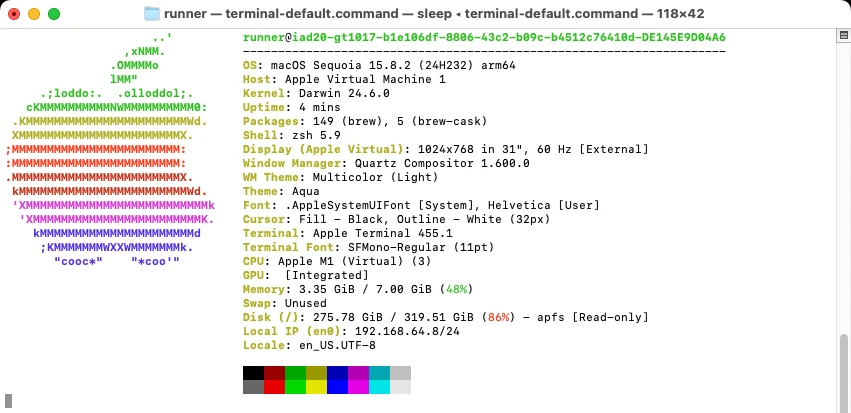
Apple's Terminal opens 80×24 windows by default, which is too small for the full output: lines wrap and the top of the logo scrolls away. We enlarged the window to 118×42 for this screenshot. Make your window larger, or set a bigger default size in Terminal's settings under Profiles → Window.
brew install neofetch failed on our runner with No available formula with the name "neofetch". Neofetch's repository was archived in 2024. fastfetch is the usual replacement, and fastfetch -c neofetch gives you Neofetch's layout (migration guide).Install with MacPorts#
sudo port install fastfetchMacPorts had 2.70.0 on 2026-11-02, with a universal variant. Unlike Homebrew, the port declares chafa as a library dependency, so libchafa is installed along with it. We didn't run MacPorts ourselves; this comes from the MacPorts port database.
Without a package manager: the universal zip#
Since 2.70.0 each release has one archive for both Apple silicon and Intel: fastfetch-macos-universal.zip from the latest release. We unpacked the 2.70.0 file:
usr/bin/fastfetch: a universal binary containing both x86_64 and arm64 code.usr/bin/flashfetch: a fixed-layout demo that its source code describes as "a dirty replicate of neofetch; demonstration only". You don't need it.- The presets, man page, and shell completions for bash, zsh and fish (60 files in all).
curl -fsSLO https://github.com/fastfetch-cli/fastfetch/releases/latest/download/fastfetch-macos-universal.zip
unzip fastfetch-macos-universal.zip
./fastfetch-macos-universal/usr/bin/fastfetchcurl, as above, don't get the flag. If you used a browser, remove the flag from the folder you unpacked (only for files you trust):
xattr -dr com.apple.quarantine fastfetch-macos-universalTo use the zip version from anywhere, copy the binary into a folder on your PATH, and the presets into /usr/local/share/fastfetch/, one of the folders fastfetch searches for them (fastfetch --list-data-paths prints the list):
sudo cp fastfetch-macos-universal/usr/bin/fastfetch /usr/local/bin/
sudo mkdir -p /usr/local/share && sudo cp -R fastfetch-macos-universal/usr/share/fastfetch /usr/local/share/
Where the config goes on macOS#
fastfetch --gen-config        # creates ~/.config/fastfetch/config.jsonc
open -e ~/.config/fastfetch/config.jsonc
fastfetch uses the same ~/.config/fastfetch/ folder on macOS as on Linux, not ~/Library. It does also check two ~/Library folders. This is the order fastfetch --list-config-paths printed on our Homebrew install; the first config.jsonc found wins:
~/.config/fastfetch/~/Library/Preferences/fastfetch/~/Library/Application Support/fastfetch/~/fastfetch//etc/fastfetch//opt/homebrew/etc/fastfetch/(Homebrew's ownetcfolder)
The configuration guide explains the file, and the recipes and themes all ran on macOS too.
Show it in every new Terminal window#
fastfetchzsh is the default shell on current macOS. In our test on macOS 26, a fastfetch line in ~/.zshrc ran once in each new interactive shell and stayed out of non-interactive commands. If you use bash instead (macOS still ships bash 3.2), Terminal starts login shells, which read ~/.bash_profile rather than ~/.bashrc. The startup guide has the tested fix, plus fish.
The cost: on our macOS runner, fastfetch added about 58 ms to opening a shell. Most of a default run there went to three modules: Display (15.5 ms), GPU (8.1 ms) and Font (4.8 ms). With hyperfine, a full default run averaged 33.5 ms over 50 runs. The lab page has the numbers for all three systems.
Apple logos#
fastfetch --logo macOS2         # a different Apple logo
fastfetch --logo-type small     # the small Apple logo
fastfetch 2.71.0 has these Apple logos: macOS, macOS_small, macOS2, macOS2_small, macOS3, macOS_old, Apple and Apple_small. Preview them in the logo gallery.
Image logos on a Mac#
Since 2.69.0, fastfetch on macOS decodes images with Apple's ImageIO framework, so the kitty, sixel and iTerm image types need no extra libraries. Which type to use depends on your terminal:
| Terminal | Logo type |
|---|---|
| iTerm2 | iterm (picked automatically) |
| kitty, Ghostty, WezTerm, Warp | kitty (picked automatically) |
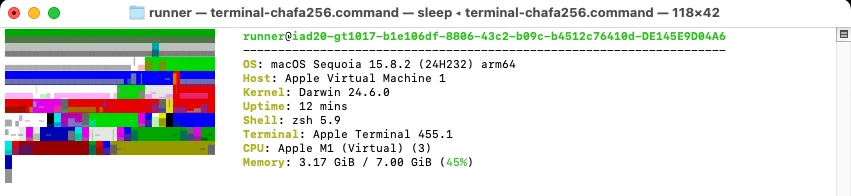
| Apple's Terminal | No image protocol. auto falls back to chafa, which was unrecognizable in our test (below) |
The chafa type loads libchafa at run time. Homebrew's fastfetch doesn't install it (chafa is only a build dependency of the formula), so run brew install chafa first. MacPorts installs libchafa along with fastfetch. More in the image logo guide.
We tried it in Apple's Terminal on macOS 15 with chafa installed. The image came out as a pattern of colored stripes, both with chafa's default colors and in 256-color mode. In Apple's Terminal, stick to ASCII logos; for pictures, use iTerm2, kitty, Ghostty or WezTerm.
Showing the install date on a Mac#
The common "OS age" trick reads the creation date of /. On macOS that volume is replaced on every system update, so it shows your last update, not your install. fastfetch's own example reads /System/Volumes/VM instead. Our tested recipe does that automatically on macOS and printed OS Age: 49 days (installed 2026-09-14) on the runner.
What we tested#
- Homebrew install and every behaviour check on the lab page: 76 of 77 passed on macOS. The one failure was a limit of our test harness with the interactive config generator.
- All 10 customization recipes and 5 color themes.
- The bash, zsh and fish startup snippets (17 of 17 passed).
- The benchmark.
A follow-up run on 2026-11-03 screenshotted Apple's Terminal on macOS 15 (above) and tested a chafa image logo there. We read the universal zip's contents and code signature from the 2.70.0 release file, and the MacPorts and Homebrew details come from their package databases. One more detail from that run: on a macOS 14 runner, Homebrew installed fastfetch 2.67.1, not 2.70.0, so older macOS versions may get an older bottle.
Questions#
How do I install fastfetch on a Mac?
Install Homebrew from brew.sh if you don't have it, then run brew install fastfetch in Terminal. It works on Apple silicon and Intel Macs.
Where is the fastfetch config file on macOS?
~/.config/fastfetch/config.jsonc, the same as on Linux. Create it with fastfetch --gen-config.
macOS says fastfetch can't be opened because the developer can't be verified
That's the GitHub zip downloaded in a browser: the binary is only ad-hoc signed, not notarized. Install with Homebrew instead, or remove the quarantine flag with xattr -dr com.apple.quarantine on the unpacked folder. Details.
Can I install Neofetch on macOS?
Not from Homebrew: it no longer has a neofetch formula. Use fastfetch with -c neofetch for the same layout.
Does fastfetch work on Intel Macs?
Yes. The universal zip contains an x86_64 build next to the arm64 one. Homebrew also works, but on 2026-11-02 it had bottles only for Apple silicon, so on Intel it compiles from source.